FreeScreenTest
Instant browser screen test for dead pixels, refresh rate, OLED burn-in and backlight bleed
Instant browser screen test for dead pixels, refresh rate, OLED burn-in and backlight bleed
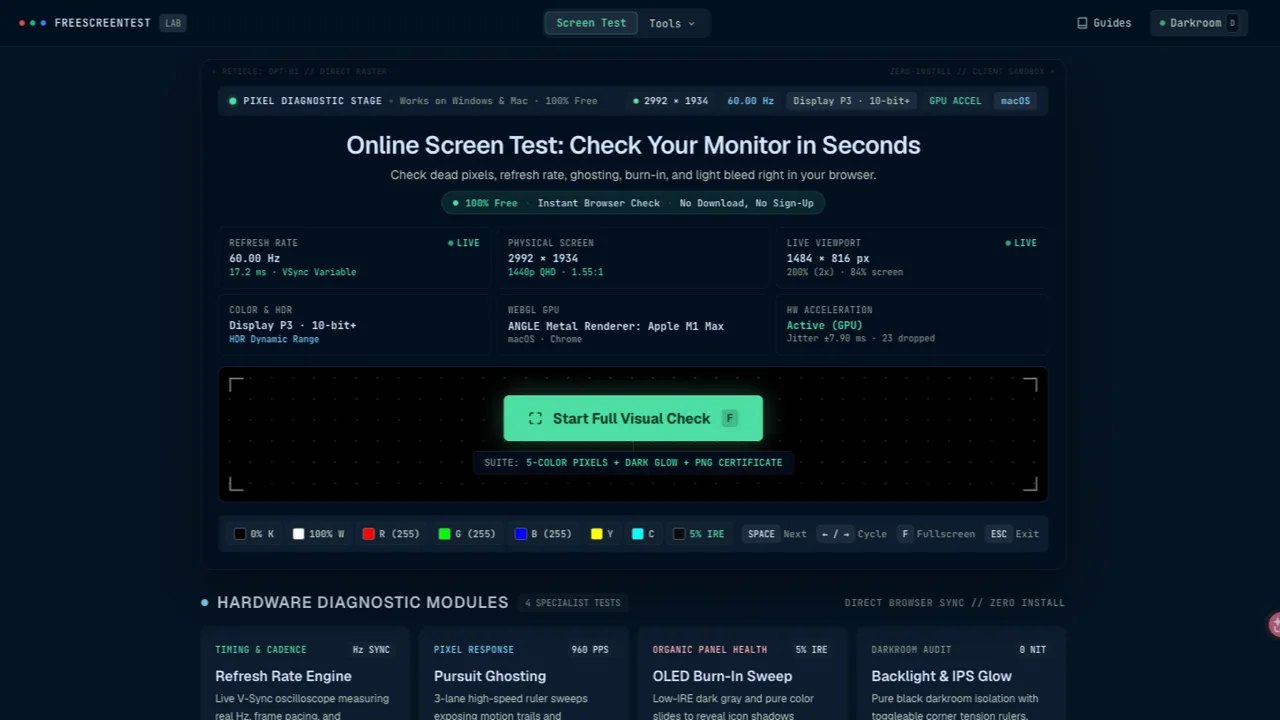
FreeScreenTest dead pixel and refresh rate test in a browser
Overview
What is FreeScreenTest?
Instant browser screen test for dead pixels, refresh rate, OLED burn-in and backlight bleed
FreeScreenTest is a free, browser-based display diagnostic. Open the site, choose a test, and a fullscreen pattern fills the screen in about half a second - no installer, no account, nothing to configure.
What it checks
- Dead and stuck pixels - solid red, green, blue, white and black fields expose dead, hot or stuck subpixels.
- Real refresh rate - a live meter measures the Hz your display actually runs at, from 60Hz to 360Hz, including dropped frames.
- OLED burn-in and uniformity - flat gray and color fields show uneven wear, tinting and image retention.
- Backlight bleed and IPS glow - a black screen in a dark room makes edge bleed and corner glow obvious.
- Motion and ghosting - a UFO pursuit test reveals pixel response, overdrive artifacts and smearing.
- Color banding - 8-bit gradient ramps expose banding and dithering.
- Resolution and DPR - the exact viewport, device pixel ratio and resolution the browser reports.
How people use it
A 7-step guided inspection walks through every check in order, or you can jump straight into one fullscreen test. Each run can export a PNG report for a warranty claim, a return, or a before/after comparison.
It runs locally on Windows, macOS, Linux, Android and iOS. No data leaves the device, nothing is installed, and every test is free.
Platforms and languages
FreeScreenTest Availability
Platforms
Languages
Capabilities
FreeScreenTest Key Features
Dead pixel test
Fullscreen solid-color fields in red, green, blue, white and black that expose dead, stuck and hot pixels.
Real refresh rate meter
Measures the actual refresh rate your display runs at, from 60Hz up to 360Hz, with dropped-frame detection.
OLED burn-in and uniformity check
Flat gray and color fields reveal uneven wear, tinting and image retention on OLED panels.
Backlight bleed and ghosting tests
Dark-room black screens expose IPS glow and edge bleed, while a UFO motion test shows pixel response and smearing.
Plans and access
FreeScreenTest Pricing
Free
FreeScreenTest Alternatives
Reviews
See what the community thinks and share your experience.
—
Based on 0 ratings
Rating distribution
Community reviews
No reviews
No written reviews yet.