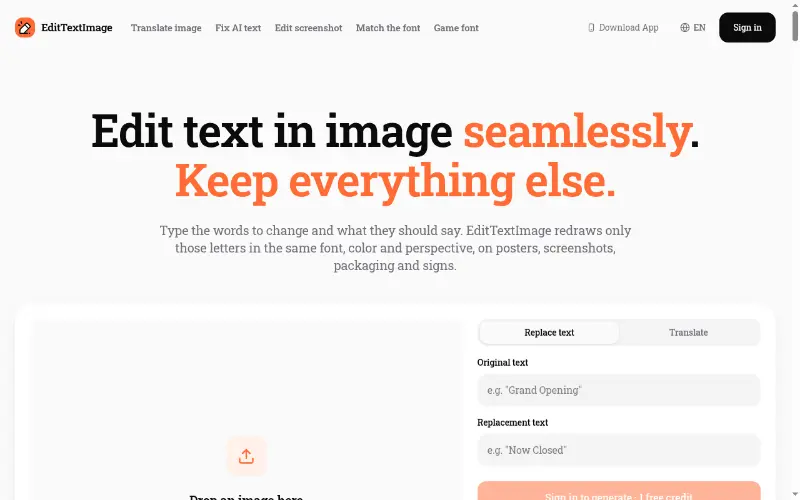
Upload an image, pick the text, type new wording and download. Free to try, no watermark.

screenshot_1280x800.jpg
Overview
What is Image Text Editor?
Change words in any JPG, PNG or WebP image online
Most image editors make you rebuild a design to change one word. Image Text Editor works the other way: it edits the text that is already in the picture and leaves the rest of the image in place.
Typical jobs include fixing a typo on an event poster, updating a price on a menu, changing a date on a banner ad, relabeling a button in a UI screenshot, and correcting misspelled text in an AI-generated image.
The workflow is simple. Upload, pick the detected text, enter the new copy, generate, and review the before-and-after comparison. Each generation edits one text block, so you can check every change before moving to the next.
Output is a flattened image with no watermark, not an editable text layer. Uploads are kept for up to 24 hours. Subscribers can run several generations at once and keep saved results for 30 to 90 days.
Platforms and languages
Image Text Editor Availability
Platforms
Languages
Capabilities
Image Text Editor Key Features
AI detection of readable text in finished images
Replace one selected text block with new wording, or remove it and rebuild the background
Plans and access
Image Text Editor Pricing
Freemium
Image Text Editor Alternatives
Reviews
See what the community thinks and share your experience.
—
Based on 0 ratings
Rating distribution
Community reviews
No reviews
No written reviews yet.