Free image-to-image editor that restyles your own photos while keeping the subject, face and framing.
imgtoimg_cover_1120x630.jpg
Overview
What is ImgToImg AI?
Restyle your own photos in seconds, free.
Overview
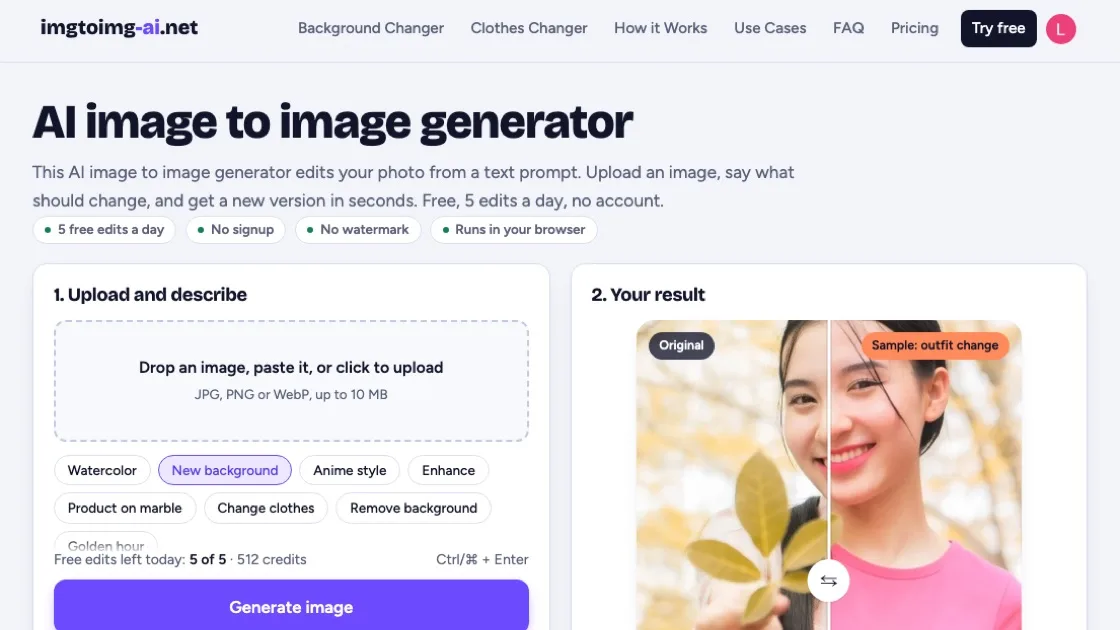
ImgToImg AI is a free browser-based image-to-image editor for people who already have a photo and need a different version of it. You upload a JPEG, PNG or WebP file, describe the change in plain language, and the tool restyles the image in seconds while keeping the subject, face and framing intact. Nothing is installed, no account is required to start, five edits are free every day, and the downloaded file carries no watermark.
Key Features
- Editing starts from a real photo instead of a text prompt, so product shots, portraits and personal pictures keep their original situation.
- Backgrounds, clothing, lighting and colour can change while the subject and its position stay intact.
- Instructions are written the way you would explain them to a friend; no masks, layers or selection tools.
- The original and the result appear side by side for a quick check before download.
- Focused entry pages cover background changes, clothing changes, hairstyles and sketch-to-image conversion.
- Works on desktop and mobile with no install.
Use Cases
Marketplace sellers can turn a kitchen-table photo into a clean listing shot without booking a studio, and the product itself stays unchanged so the listing still shows the real item. Small shops can place one product in several settings to build a consistent set of social posts. Designers can test a background or clothing direction on an existing frame before paying for a shoot. Anyone restyling a personal photo can do it without learning an editor.
Pricing and Limits
Five edits per day are free, with no account and no card, and the allowance resets daily. Uploads are limited to 10 MB and to JPEG, PNG or WebP. This is not a full photo editor: it does not replace layers, curves or precise masking, and it does not generate an image from nothing.
Platforms and languages
ImgToImg AI Availability
Platforms
Languages
Capabilities
ImgToImg AI Key Features
Image-to-image editing from your own photo
Upload a JPEG, PNG or WebP photo and describe the change in plain language. Background, clothing or lighting can change while the subject, face and framing stay intact.
Plans and access
ImgToImg AI Pricing
Freemium
Free plan: 5 image edits per day
The free tier allows five image edits per day with no account or card. Uploads are limited to 10 MB, JPEG/PNG/WebP files.
ImgToImg AI Alternatives
 AIChristmasTurn a selfie into a Christmas portrait. No prompts needed.
Reviews
See what the community thinks and share your experience.
—
Based on 0 ratings
Rating distribution
Community reviews
No reviews
No written reviews yet.