Turns your laptop and phones into a multi-camera studio: press record once, and AI syncs every angle and creates your first edit.
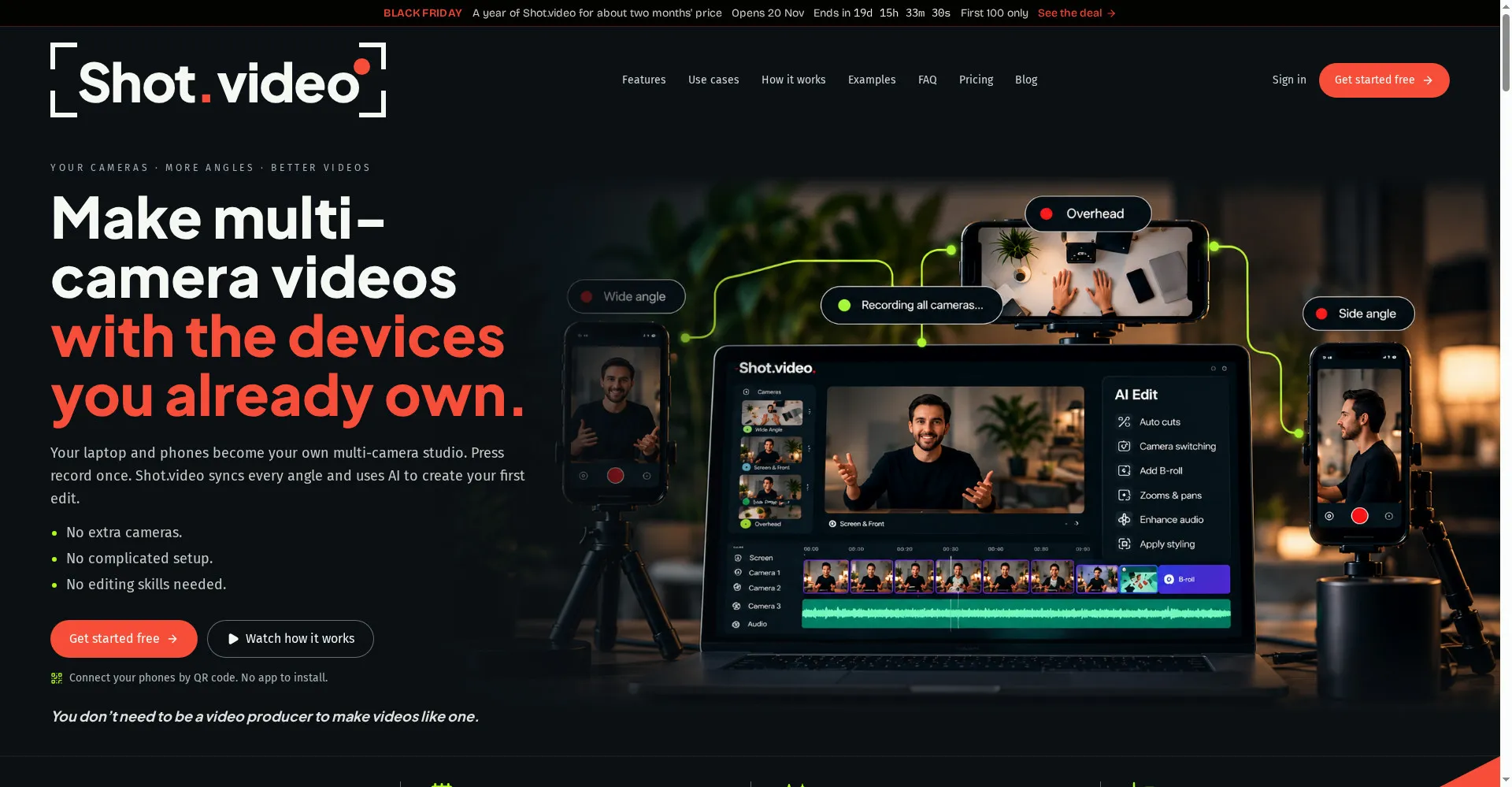
Shot.video homepage
1 / 2Overview
What is Shot.video?
Make multi-camera videos with the devices you already own
Shot.video turns the devices you already own into a multi-camera studio. Your laptop and phones become your cameras: press record once, and Shot.video syncs every angle and uses AI to create your first edit.
- Connect phones by QR code — no app to install
- AI picks the best camera for each moment, zooms into the busy part of your screen and suggests B-roll
- Auto cuts, camera switching, zooms and pans, audio enhancement and styling
- Every AI choice stays editable: change any shot, trim, crop or move it
- No extra cameras, no complicated setup, no editing skills needed
Free plan includes 2 Video Credits; paid plans from $19 per month. No card is needed to start.
Platforms and languages
Shot.video Availability
Platforms
Languages
Capabilities
Shot.video Key Features
Multi-camera with your own devices
Your laptop and phones become a multi-camera studio — connect by QR code, no app to install.
AI first edit
Shot.video syncs every angle and uses AI to create your first edit automatically.
AI camera switching
AI picks the best camera for each moment, zooms into the busy part of your screen and suggests B-roll.
Every choice stays editable
Change any shot, trim, crop or move B-roll — nothing is locked in.
No extra gear
No extra cameras, no complicated setup, no editing skills needed.
Best for
Who uses Shot.video?
YouTubers and course creators
Record multi-angle videos with the phones and laptop you already own
Teams recording demos and tutorials
Get a polished first edit from AI without learning an editor
Plans and access
Shot.video Pricing
Freemium
Free plan includes 2 Video Credits; Creator $19/mo, Pro $39/mo, Studio $79/mo. No card needed.
Common questions
Shot.video FAQs
What is Shot.video?
Shot.video turns your laptop and phones into a multi-camera studio. Press record once and it syncs every angle, then AI creates your first edit.
Do I need extra cameras or an app?
No. Your laptop and phones are the cameras. Connect a phone by scanning a QR code — no app to install.
How do credits work?
Video Credits pay for AI edits and B-roll Credits pay for generated images and clips. The free plan includes 2 Video Credits and 5 B-roll Credits, once. Your own uploads and manual edits are always free.
Can I change what the AI decided?
Yes. Every AI choice stays editable — change any shot, trim, crop or move B-roll before you export.
Reviews
See what the community thinks and share your experience.
—
Based on 0 ratings
Rating distribution
Community reviews
No reviews
No written reviews yet.