Private Android screenshot search with on-device OCR, organization, Pro cleanup and optional AI Enhance.
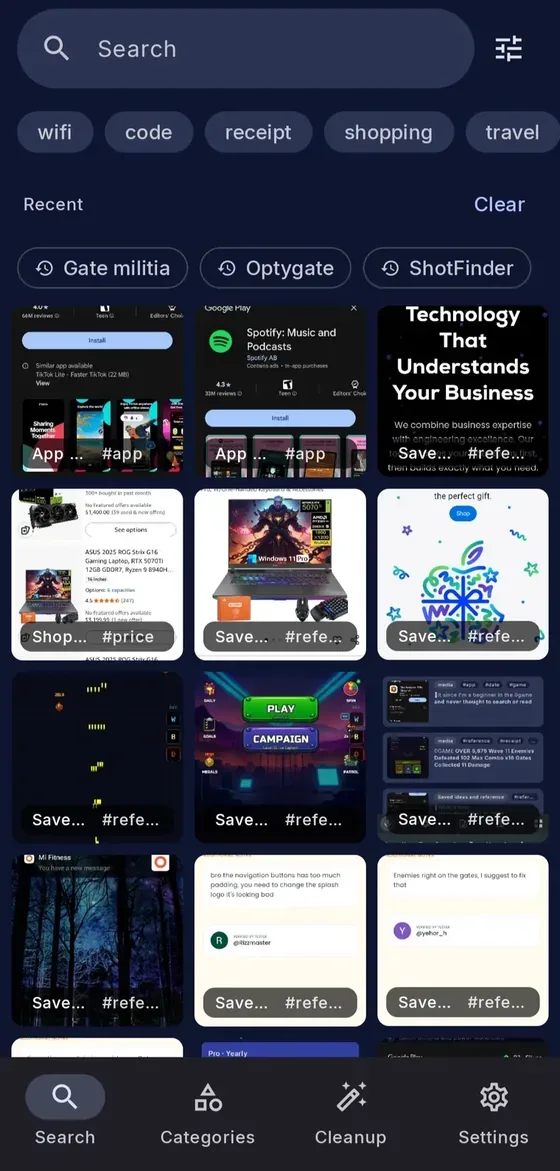
ShotFinder screenshot search with text chips, recent queries and a saved-image grid
Overview
What is ShotFinder?
Find the screenshot you saved, by the words inside it.
Find saved screenshots by their text
ShotFinder is an Android screenshot organizer by Optygate. Search for a store name, booking number, code, address or phrase to retrieve a screenshot you saved. Core on-device Latin OCR, automatic tags and categories, Favorites and everyday smart actions work offline without an account, ads or tracking.
Organize, clean up and export with Pro
Pro adds unlimited named collections, advanced filters, batch actions and search within collections, Favorites and categories. Filter global search by one or more collections. Review duplicate, similar, blurry and old-code images, then copy or move originals or export screenshots and multiple collections as ZIPs or folders. Exports preserve original image bytes and support pause/resume and history.
Optional AI for difficult screenshots
AI Enhance can help with handwriting, low-quality images and non-Latin text when on-device OCR is insufficient. It processes only the screenshot you choose and its extracted text; it requires Pro, AI credits and internet. It is never automatic or a batch upload. Optional organization sync is off by default and does not upload screenshots or OCR text.
Start free, upgrade when useful
Core tools stay free. Current USD reference Pro options include monthly, yearly and $19.99 one-time Lifetime, with 500 starting Lifetime AI credits once. Local prices and eligible offers appear in the app before purchase. Pro requires Google sign-in and periodic online verification.
Official Android download: https://play.google.com/store/apps/details?id=com.optygate.screenshotsearch
Platforms and languages
ShotFinder Availability
Platforms
Languages
Capabilities
ShotFinder Key Features
Private screenshot text search
Find receipts, codes, bookings and notes with on-device Latin OCR. Core search, tags, categories, Favorites and smart actions work offline without an account, ads or tracking.
Organization and scoped Pro search
Use automatic tags, categories, Favorites and archive to keep screenshots useful. Pro adds unlimited named collections, advanced filters and search within collections, Favorites and categories, plus global filtering by one or more collections.
Pro cleanup and original-file exports
Review duplicate, similar, blurry and old-code screenshots. Copy or move originals and export selected screenshots or multiple collections as ZIPs or folders, preserving original image bytes. Exports support pause/resume and history.
Optional AI Enhance
Choose a screenshot when on-device OCR needs help with difficult images, handwriting or non-Latin text. Only that selected screenshot and its extracted text are sent for cloud processing. Pro, AI credits and internet are required.
Plans and access
ShotFinder Pricing
Freemium
Core screenshot search and everyday organization are free, with no account, ads or tracking. Current USD reference Pro prices are $1.99/month, $12.99/year or $19.99 Lifetime, paid once. The Lifetime offer saves 60% against the $49.99 USD reference price and includes 500 starting AI credits once. Monthly includes 150 AI credits each month; Yearly includes 1,200 each year. Pro adds cleanup, unlimited collections, advanced filters, batch actions, scoped search and original-file ZIP/folder exports. AI Enhance is optional and requires Pro, credits and internet. Pro requires Google sign-in and periodic online verification (at least every 7 days; subscription expiry may shorten offline access). Local prices and available offers are shown in the app before purchase.
Compare similar tools
ShotFinder Alternatives
Reviews
See what the community thinks and share your experience.
—
Based on 0 ratings
Rating distribution
Community reviews
No reviews
No written reviews yet.