Organize your iPhone Home Screen from your Mac. Rearrange your layout, cut monthly swipes using your usage data, or let your AI assistant do it.
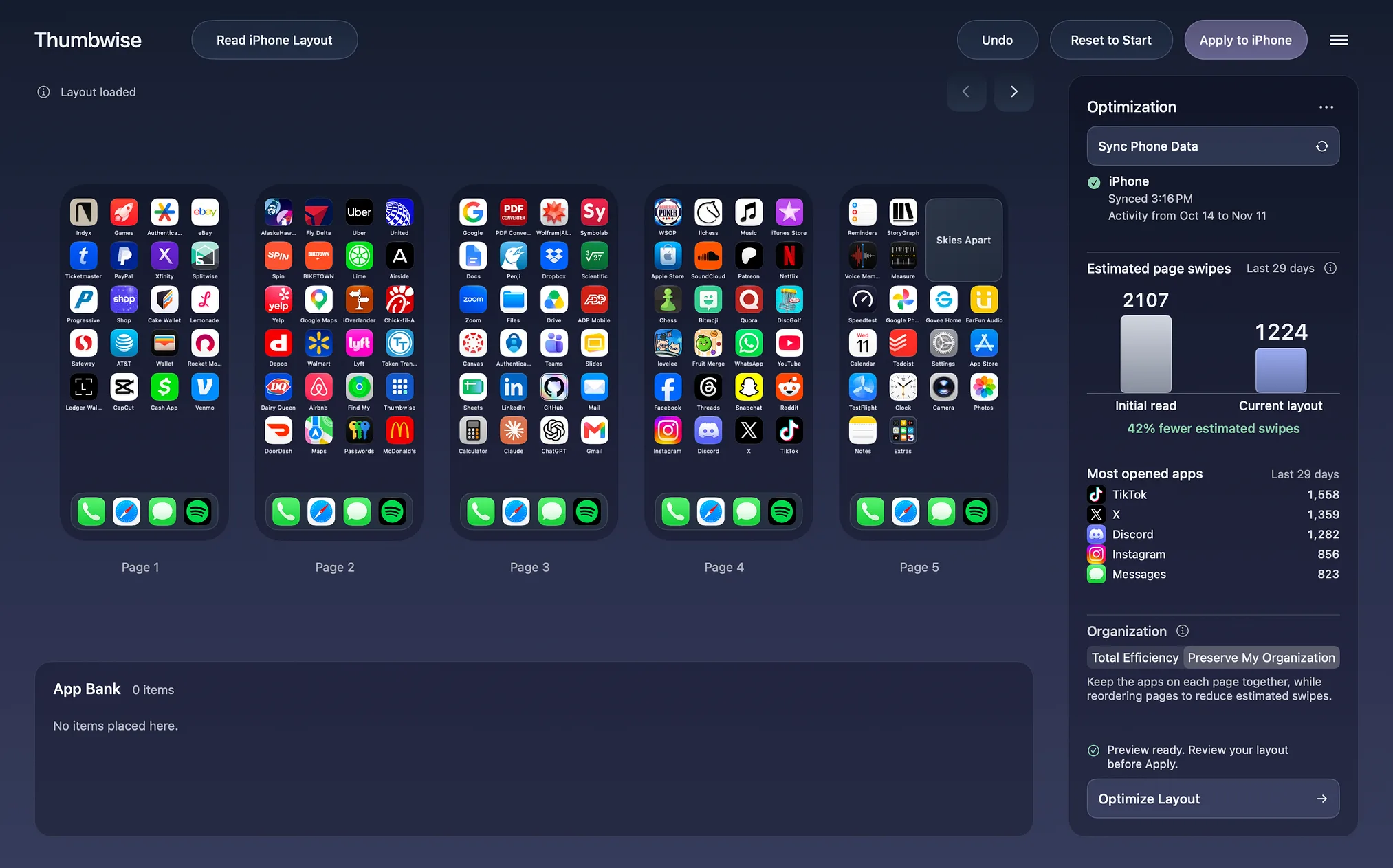
Thumbwise Mac app home screen editor
1 / 3Overview
What is Thumbwise?
Organize your iPhone apps from your Mac
Thumbwise is a Mac app for rearranging your iPhone Home Screen from your Mac. Connect the phone with a USB data cable and it reads your pages, Dock, folders, widgets and App Library. Drag things around with a mouse, preview the result, then apply it. Thumbwise backs up your current layout first and reads the phone back afterward to confirm it matches. It can also look at the last 30 days of app usage and reorder your pages so the apps you open most take the fewest swipes. If you use Claude or another AI assistant, a local MCP server lets you ask it to organize things for you, and nothing changes on the phone until you apply. Your data stays on your Mac, and no account is needed. Reading, editing and optimizing are free. Applying a layout is a one-time $14.99 for up to three Macs. Requires an Apple silicon Mac on macOS 15 or later and an iPhone on iOS 27.
Platforms and languages
Thumbwise Availability
Platforms
Languages
Product video
Thumbwise in action
Capabilities
Thumbwise Key Features
Home Screen editor
Drag pages, Dock, folders and widgets with a mouse, preview, then apply to the iPhone over USB.
Plans and access
Thumbwise Pricing
Freemium
Free to read, edit and optimize; $14.99 one-time to apply layouts
Free to read, edit and optimize. $14.99 one-time to apply layouts (up to 3 Macs).
Thumbwise Alternatives
Reviews
See what the community thinks and share your experience.
—
Based on 0 ratings
Rating distribution
Community reviews
No reviews
No written reviews yet.