Video Object Remover
Remove unwanted people and objects from videos with simple text prompts.
Remove unwanted people, objects, logos, and watermarks from videos using simple text prompts.
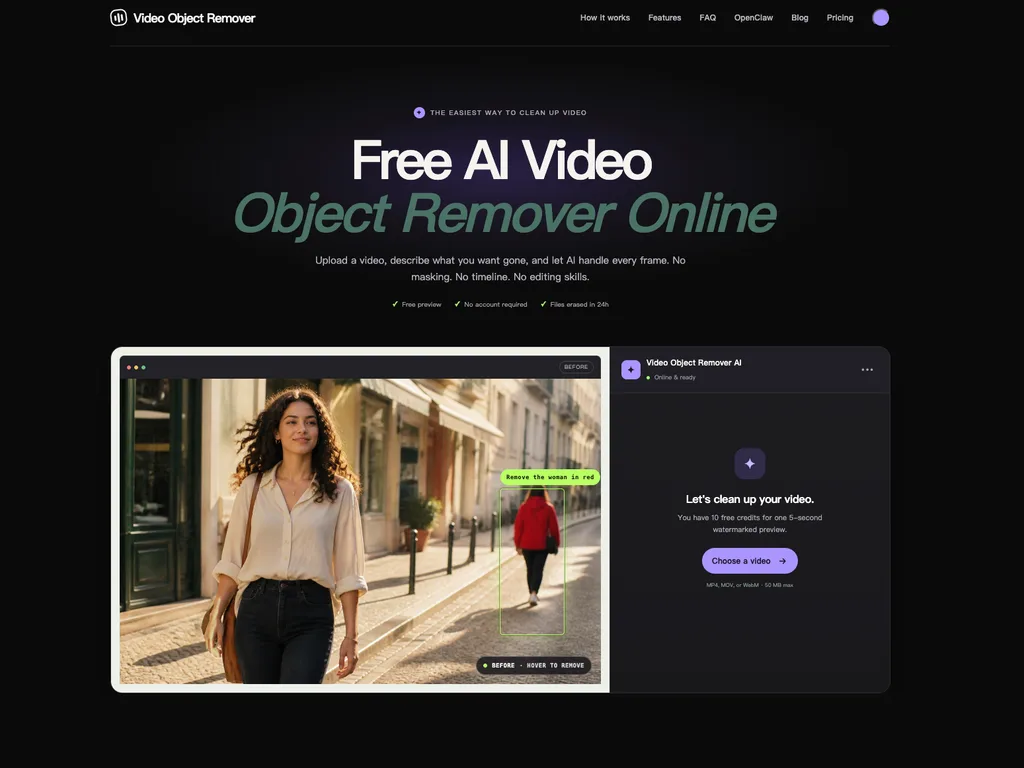
Remove unwanted objects with text prompts
1 / 3Overview
What is Video Object Remover?
Remove unwanted people and objects from videos with simple text prompts.
What makes Video Object Remover useful?
Video Object Remover is a browser-based AI tool for removing unwanted people, objects, logos, watermarks, and other distractions from videos.
The workflow is designed to be simple. Upload a video, describe what you want removed in plain language, and let the AI process the edit automatically. For example, you can type “remove the person in black” or “remove the logo in the corner.”
Unlike traditional object removal workflows, there is no need to manually draw masks, track objects across individual frames, or learn a professional video editing timeline.
The tool is useful for content creators, marketers, social media users, small businesses, and anyone who occasionally needs to clean up video footage.
Common use cases include removing background people, distracting objects, logos, watermarks, signs, timestamps, and other visual clutter.
Video Object Remover runs directly in the browser and supports common video formats including MP4, MOV, and WebM.
It uses a freemium model, allowing users to try the tool before purchasing credits for additional video processing.
Platforms and languages
Video Object Remover Availability
Platforms
Languages
Capabilities
Video Object Remover Key Features
Text-based object removal
Describe the person, object, logo, watermark, or distraction you want removed in plain language instead of drawing a mask manually.
Remove unwanted people and objects
Clean up videos by removing unwanted people, background objects, signs, logos, watermarks, and other visual distractions.
No manual masking
Remove objects without painting masks frame by frame or manually tracking the target throughout the video.
Browser-based video editing
Upload and process videos directly in the browser without installing desktop editing software.
Simple video cleanup workflow
Upload a video, describe what should be removed, let the AI process it, then preview and download the result.
Best for
Who uses Video Object Remover?
Content creators
Remove unwanted people, objects, logos, watermarks, and background distractions before publishing videos.
Social media creators
Clean up short-form videos for TikTok, Instagram, YouTube, and other social platforms without manual masking.
Marketers
Remove distracting elements from product demos, ads, and promotional videos so the main subject stays in focus.
Small businesses
Edit product and promotional videos online without needing professional video editing software or advanced editing skills.
Casual video editors
Quickly remove an unwanted person or object from a video without learning timelines, tracking, or frame-by-frame editing.
Plans and access
Video Object Remover Pricing
Freemium
From $3.99
Free 5-second preview with no credit card required. Paid processing starts at $3.99 for 100 credits, with larger credit packs available at $9.99 and $29.99. No subscription is required.
Compare similar tools
Video Object Remover Alternatives
 Runway AIRunway is an applied AI research company shaping the next era of art, entertainment and human creativity.AI Design ArtAI Video Creationvideo-generationcreativity-toolsAI-research
 CapCutCapCut is an all-in-one creative platform powered by AI that enables video editing and image design on browsers, Windows, Mac, Android, and iOS.4.0(1 reviews)AI Video Creation
 Cleanup PicturesRemove unwanted objects, people, text, watermarks, and blemishes from photos with AI.AI Specialized ToolsAI Design Artobject removalphoto cleanupimage editing
Reviews
See what the community thinks and share your experience.
—
Based on 0 ratings
Rating distribution
Community reviews
No reviews
No written reviews yet.