
How to Check If an Image, Video, or Audio Clip Was Made by AI: A Step-by-Step Guide to Google's SynthID Detector
A video of a public figure saying something outrageous lands in your feed. The lighting looks real, the lip movements match, and thousands of people are already sharing it. A year ago, your only options were to squint at pixels or trust the comments. On October 7, 2026, Google gave everyone a better first step: it opened its SynthID Detector — previously limited to journalists, media professionals, and researchers who had been testing it since Google I/O 2025 — to anyone with a browser.
The tool doesn't scan for "AI vibes." It looks for a specific invisible watermark, called SynthID, that a growing list of AI models embed into the images, videos, and audio they generate. This guide walks you through exactly how to use it — what you need, what to click, how to read the results, and, just as importantly, what a result does and doesn't prove.
What SynthID Detector Is (and Isn't)
SynthID Detector is a free web tool hosted by Google at synthid.com. Upload a photo, video, or audio file, and it tells you whether the file carries a SynthID watermark — a machine-readable signal embedded at generation time by participating AI models.
Which models participate? Google's own lineup — Nano Banana, Veo, and Lyria, plus tools with generation capabilities such as Gemini, Flow, ProducerAI, and Vids — all watermark their output with SynthID. OpenAI, Nvidia, and Kakao also support the standard, and Apple is said to be adding support later this year. Google says people already make about 1 million verification requests every day.
Here's the crucial part most people miss: SynthID Detector is not a general-purpose "AI or not" detector. It can only find media that uses the SynthID technology. A photo generated by a model that doesn't watermark its output will come back clean — and "clean" is not proof of human authorship. Think of it as a label checker, not a lie detector.
Before You Start: What You Need
Three things:
- A file to check. Supported formats are generous: images (JPG, JPEG, PNG, BMP, WEBP, AVIF, HEIC, HEIF, TIFF, TIF, GIF), video (MP4, MOV, WEBM), and audio (WAV, MP3, OGG, FLAC, AAC, M4A). If your file is in a different container, convert it first.
- A Google account. Signing in is required to use the site.
- English. The worldwide rollout is currently available in English.
One privacy note worth knowing before you upload anything sensitive: Google's privacy notice for the service says uploaded media is processed in real time and deleted immediately once results are returned. To enforce daily usage quotas and defend against abuse, the service keeps only a digital signature of your file, mapped to your user ID, and permanently deletes it after 24 hours.
Step-by-Step: Checking a File with SynthID Detector
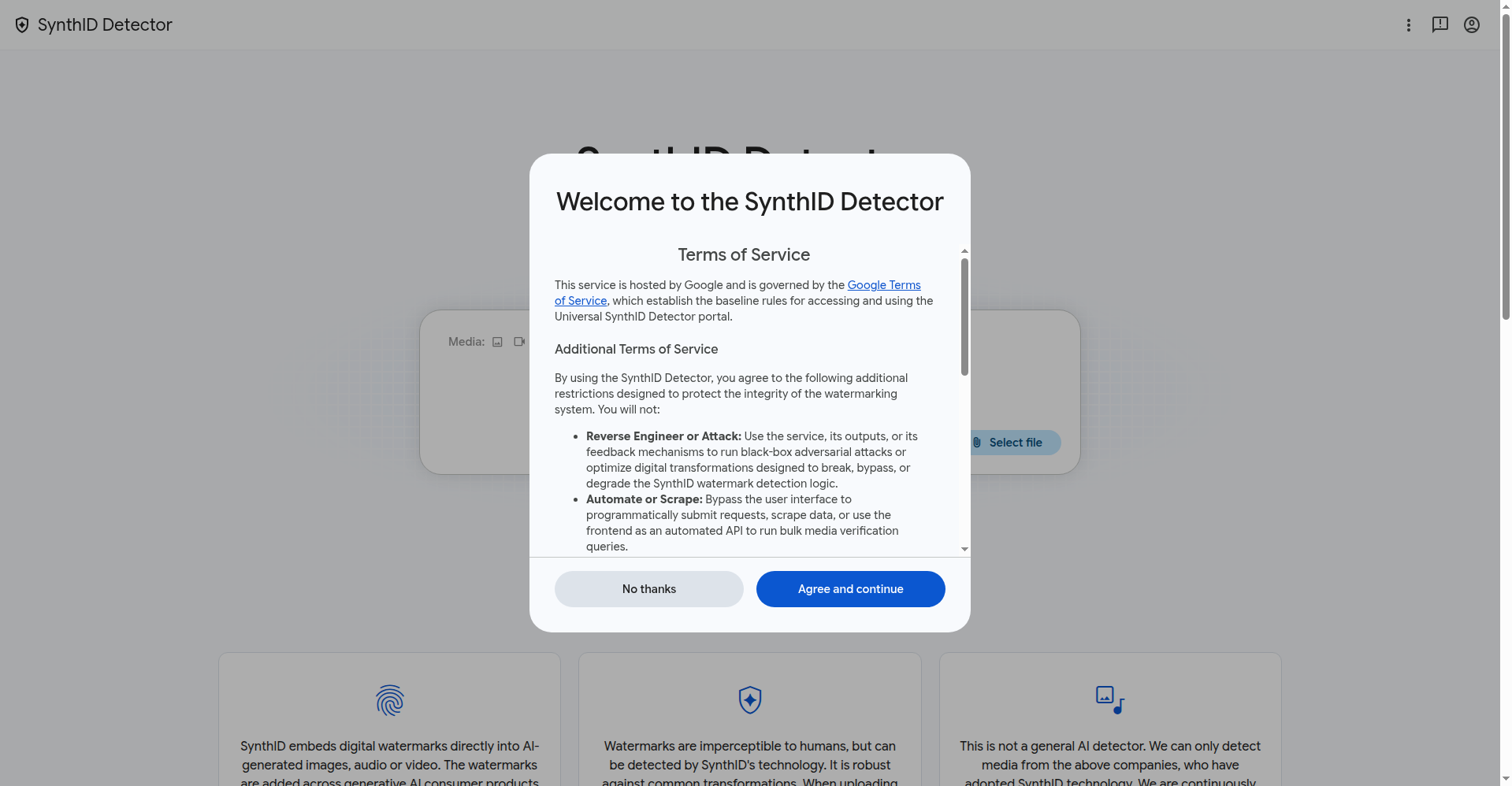
Step 1: Go to synthid.com and sign in. Open the site in any modern browser and sign in with your Google account. You'll also be asked to accept additional terms designed to protect the watermarking system — notably, no reverse-engineering the detection logic and no automated or bulk submissions.
Step 2: Upload your file. Use the upload control to select a photo, video, or audio clip from your device (drag-and-drop typically works too). There's no need to install anything; the whole thing runs in the browser.
Step 3: Wait for the analysis. Processing happens in real time. For typical photos and short clips, results come back in seconds; larger video files may take longer.
Step 4: Read the result. The site reports whether it found a SynthID watermark in your file. That's the whole verdict — there is no percentage score or confidence meter to decode.
Step 5: Decide what to do with the answer. A positive result is strong evidence the media came from a participating AI model. A negative result means "no SynthID watermark found" — nothing more. Don't treat it as a certificate of authenticity.
How to Read Your Results (Without Overtrusting Them)
Positive ("watermark detected"): The file contains a SynthID mark. Per Google, the mark is embedded by models from Google, OpenAI, Nvidia, and Kakao that support the standard. This is about as close to a smoking gun as automated checking gets.
Negative ("no watermark found"): This is the result people misread. It can mean the media is genuinely human-made — or that the watermark was stripped by heavy editing, that the file was generated by a model outside the SynthID ecosystem, or that the watermark simply didn't survive format conversion. Google itself frames the tool as a watermark checker, not an AI detector.
Ambiguous cases: The tool cannot distinguish between AI-created and AI-edited media. A real photograph that an AI tool merely retouched or upscaled may carry a watermark too. Context still matters — check the source, the date, and whether other outlets corroborate.
A Worked Example: Checking a Viral Image
Say a dramatic photo of a flooded city street is spreading on social media, and the caption claims it was taken this morning. Here's how the check plays out in practice:
- Save the image. Download the original post's image rather than a re-uploaded copy — every re-encode risks degrading a watermark.
- Upload it to synthid.com after signing in, and wait for the verdict.
- Watermark found? The image was produced or touched by a participating AI model. Treat the "taken this morning" claim as unreliable until a trusted outlet confirms it.
- No watermark found? You've ruled out one specific thing: a SynthID mark. The photo could still be AI-generated by a non-participating model, or the watermark could have been stripped in transit. Now do the human work — reverse-image search, check the weather in that city today, look for the original photographer.
The pattern is always the same: the detector narrows the possibilities, it doesn't close the case.
Limitations Worth Knowing Before You Rely On It
- Coverage is opt-in. Only models that embed SynthID watermarks can be caught. Microsoft and Meta run their own separate watermarking and verification standards, so their AI-generated media won't show up here.
- Watermarks are fragile. Aggressive cropping, recompression, or format-shifting can degrade or remove the signal. A screenshot of a screenshot of an AI image may come back clean.
- No batch or API use. The terms explicitly forbid automating submissions or using the frontend as a bulk verification API. If you're a newsroom that needs scale, you'll need a different workflow.
- Built-in alternatives exist. SynthID checks are already integrated into the Gemini app, Google Chrome, and Google Search, so you may get the same answer without a separate upload in some contexts.
Who This Is Actually Useful For
- Journalists and fact-checkers triaging viral images and clips before publishing.
- Teachers and hiring managers sanity-checking suspiciously polished submissions — with the caveat that a negative result proves nothing.
- Everyday users who want a quick first filter on the too-perfect photo circulating in a group chat, before resharing it.
The Bottom Line
SynthID Detector won't end the era of convincing fakes, and Google doesn't claim it will. What it does is give everyone a free, fast, privacy-conscious first check grounded in an actual technical signal rather than guesswork. Use it as step one of verification, not the whole process: watermark check, then source check, then corroboration. In a feed full of confident fakes, a thirty-second upload is the cheapest skepticism you can buy.
References
- Ivan Mehta, "Google's new SynthID website can identify AI-generated media," TechCrunch, October 7, 2026. https://techcrunch.com/2026/10/07/googles-new-synthid-website-can-identify-ai-generated-media/
- Juli Clover, "Google's SynthID AI Detector is Now Available to Everyone," MacRumors, October 7, 2026. https://www.macrumors.com/2026/10/07/google-synthid-detector/
- Google, "SynthID Detector," https://synthid.com