DisplaySwitcher
Switch monitor inputs and transfer text and files between Linux, macOS, and Windows computers.
Switch monitor inputs and transfer text and files between Linux, macOS, and Windows computers.
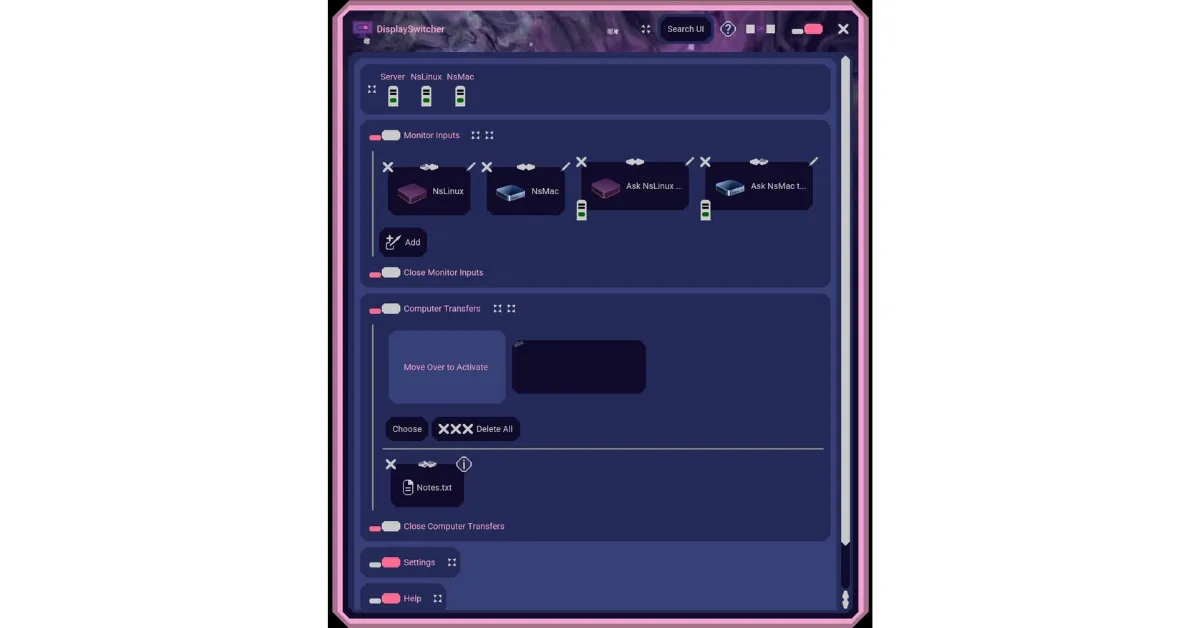
DisplaySwitcher monitor inputs and computer transfers
Overview
What is DisplaySwitcher?
Switch monitor inputs and transfer text and files between Linux, macOS, and Windows computers.
DisplaySwitcher is a desktop application for Linux, macOS, and Windows that combines monitor input switching with text and file transfers between computers.
Switch a monitor’s video input with a software button instead of reaching for its physical controls. If one computer cannot switch the monitor directly, another connected computer capable of switching it can act.
Transfer text and files between computers using cut-and-paste, drag-and-drop, or file browsing, including across different operating systems. No network or firewall configuration is necessary.
DisplaySwitcher is designed for people working with multiple computers, including developers, IT professionals, and home office users.
It costs $5.95 per month and includes a one-month free trial.
Platforms and languages
DisplaySwitcher Availability
Platforms
Languages
Capabilities
DisplaySwitcher Key Features
Monitor input switching
Switch a monitor’s video input with a software button instead of reaching for its physical controls. If one computer cannot switch the monitor directly, another connected computer capable of switching it can act.
Cross-platform text and file transfer
Transfer text and files between computers using cut-and-paste, drag-and-drop, or file browsing, including across different operating systems.
No network setup needed
No network or firewall configuration is necessary. Works across Linux, macOS, and Windows computers.
Best for
Who uses DisplaySwitcher?
Developers, IT professionals, and home office users
People working with multiple computers who share one monitor and need to move text and files between Linux, macOS, and Windows machines.
Plans and access
DisplaySwitcher Pricing
Paid
$5.95/month
It costs $5.95 per month and includes a one-month free trial.
DisplaySwitcher Alternatives
 FilexHostThe simplest way to host & share your files. Drag & drop any file to get a live shareable URL in seconds.
Reviews
See what the community thinks and share your experience.
—
Based on 0 ratings
Rating distribution
Community reviews
No reviews
No written reviews yet.