A desktop app that records your workday into on-device, searchable memory your AI agents can use.
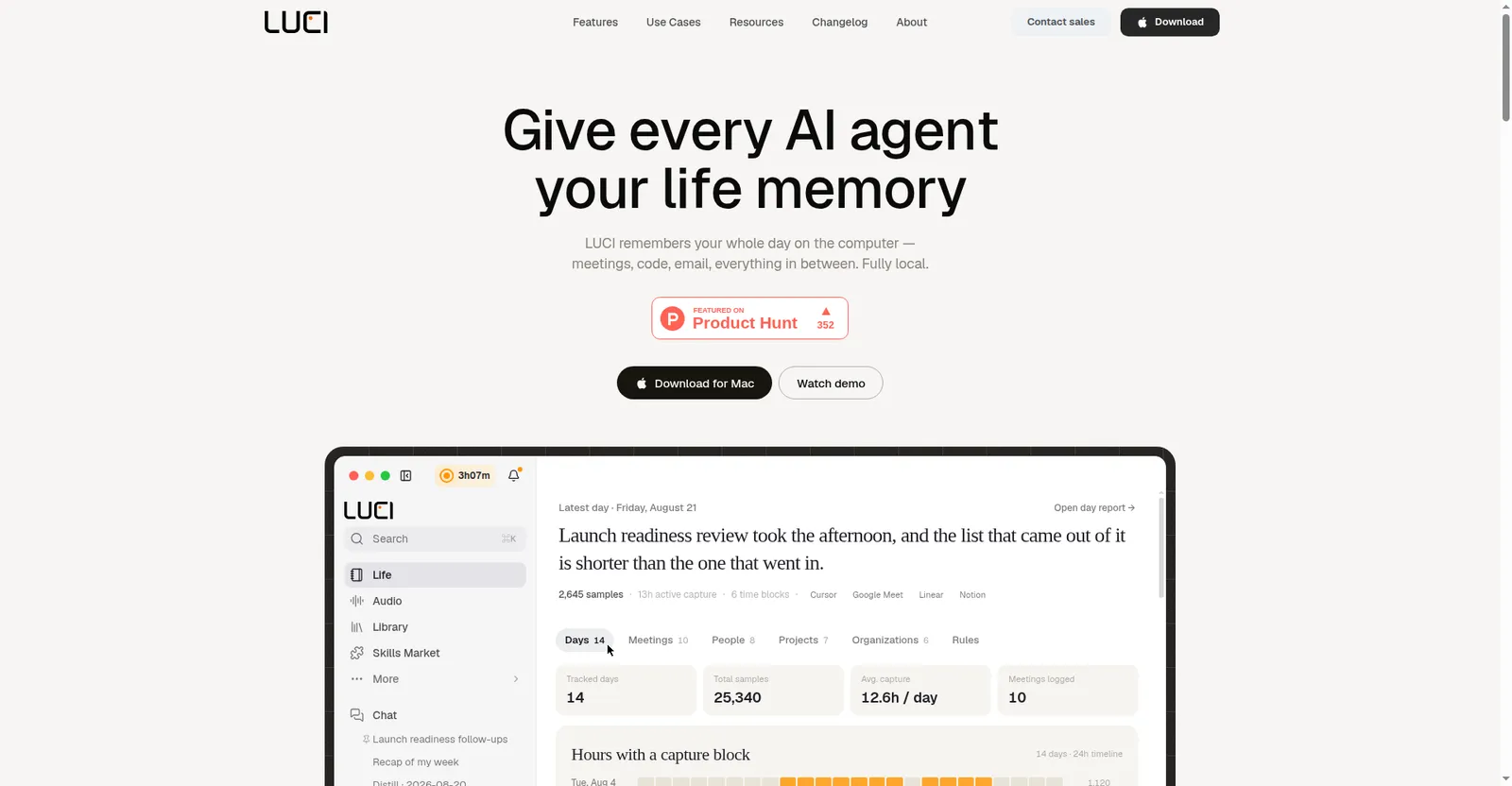
LUCI Desktop homepage
1 / 2Overview
What is LUCI?
Let your AI agents remember what you've seen
LUCI is a desktop app that continuously records your whole day on the computer — meetings, code, email, everything in between — into an on-device, always-searchable memory, and gives your AI agents memory of it.
Screen capture, meeting transcripts, and voice are understood locally (local models such as Phi, Qwen, Llama, DeepSeek), organized into a day-by-day chronology, distilled into short written records in your "Life folder", and searchable in plain English. Official agent skills let Claude Code, Cursor, Codex, Gemini, Copilot, and others query that memory directly — so your agent can recall what was on your screen minutes ago instead of you copy-pasting context. The AI meeting notetaker covers Zoom, Google Meet, and Teams with unlimited transcription.
Privacy: 100% local — encrypted at rest, no cloud copy, zero-leak redaction of cards, keys, and passwords before anything is saved. GDPR compliant, SOC 2 Type 2 certified.
Pricing: one plan, $0 forever — everything included, no credit card required. Currently available for macOS 15.0+ (Apple Silicon); Windows & Linux are listed as coming soon.
Platforms and languages
LUCI Availability
Platforms
Languages
Capabilities
LUCI Key Features
Continuous screen & visual memory
Continuous screen capture; Chronology lays your day end to end with a capture-block heatmap, and LUCI reads and understands what's on screen.
Voice & AI meeting notes
Every word in meetings and calls is captured and attached to the day it happened; auto notetaker for Zoom, Google Meet, and Teams with unlimited transcription and real-time coaching.
Search & distill
Ask in plain English across screen and meetings; your agent distills the raw day into a short written record in your "Life folder" and can recap your week.
Agent memory integrations
Official skills for Claude Code, Codex, Cursor, Gemini, Copilot, Windsurf, Zed, and more — LUCI connects itself, nothing to set up.
Voice tasks & workflows
Unlimited voice-triggered tasks and advanced agent skills and custom workflows.
100% local privacy
On-device understanding with local models (Phi, Qwen, Llama, DeepSeek); encrypted at rest; no cloud copy; zero-leak redaction.
Best for
Who uses LUCI?
Developers, founders, researchers, consultants, designers, support and ops teams
Give their AI agents searchable memory of everything they saw and heard during the workday
Meeting-heavy knowledge workers
Automatically capture, transcribe, and distill meetings without manual notes
Plans and access
LUCI Pricing
Free
One plan, $0 forever; everything included, no credit card
Common questions
LUCI FAQs
How does LUCI give my AI agents memory?
LUCI continuously captures your screen, meetings, and calls on-device, understands them with local models, and files them into a searchable day-by-day memory your AI agents can query through official skills (Claude Code, Cursor, Codex, and more).
Is my recorded data private?
Yes. LUCI is 100% local: models run on your device, data is encrypted at rest, there is no cloud copy, and credentials like cards, keys, and passwords are blacked out before anything is saved. It is GDPR compliant and SOC 2 Type 2 certified.
Is LUCI available for Windows?
The official download page lists macOS 15.0+ (Apple Silicon) as available; the site also says Windows and Linux are coming soon. Check the current download page for the latest platform status.
What does LUCI cost?
LUCI has one plan that is free forever — unlimited agent runs, meeting recording and transcription, and voice tasks are all included with no credit card required.
Reviews
See what the community thinks and share your experience.
—
Based on 0 ratings
Rating distribution
Community reviews
No reviews
No written reviews yet.