Online Alarm Clock
Set a free alarm online in your browser — no app download, no account needed.
A free web-based alarm clock with timer, stopwatch, countdown and world clock. Runs entirely in the browser; your alarms stay on your own device.
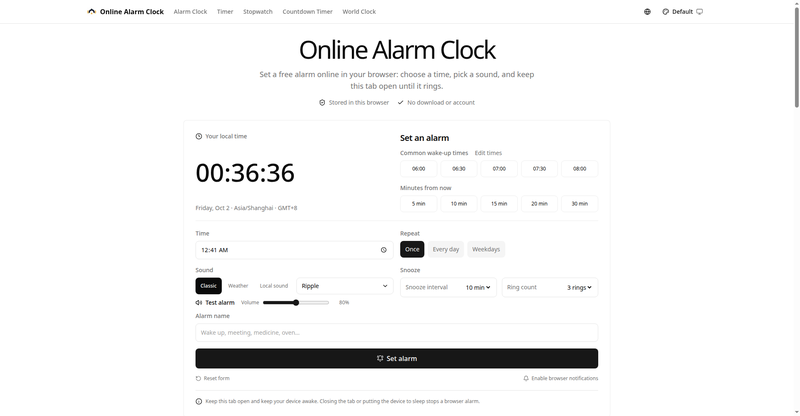
Online Alarm Clock homepage
1 / 3Overview
What is Online Alarm Clock?
Set a free alarm online in your browser — no app download, no account needed.
Online Alarm Clock is a free alarm clock that runs entirely in your browser. Pick a time, choose a sound, and keep the tab open until it rings — no app to download, no account to create, and your schedule never leaves your device.
Beyond the alarm itself, the site bundles the timing tools people reach for every day: a countdown timer, a stopwatch, a date countdown, and a world clock, all free and all working without sign-up.
The alarm stays accurate by comparing your target against the device clock rather than ticking second by second, so it recalculates correctly even when the tab sits in the background. After the page and sound load, no internet connection is required — though the tab must stay open and the device awake for the alarm to ring.
The interface is available in English and Chinese, and alarm settings are stored locally in the browser, so reminders for medication, study breaks, or a morning routine are right where you left them when you return on the same device.
Platforms and languages
Online Alarm Clock Availability
Platforms
Languages
Capabilities
Online Alarm Clock Key Features
Online alarm with live countdown
Set any date and time or use quick presets like common wake-up times and minutes-from-now. The next alarm shows a live countdown and stays accurate when the tab is in the background.
Repeat, snooze and custom sounds
Configure repeat mode, snooze interval, ring count and alarm name. Pick from built-in classic and weather sounds or load a local audio file, with volume control and a test button.
Timer, stopwatch, countdown and world clock
The same site includes a duration timer, a stopwatch for workouts and study sessions, a countdown to a future date or deadline, and a world clock across time zones.
Private by design
Alarm settings are stored in the browser on your device. Nothing is uploaded to a server and no account is required.
English and Chinese interface
Full bilingual UI, and the alarm keeps working after the page loads even if the connection drops — as long as the tab stays open and the device stays awake.
Plans and access
Online Alarm Clock Pricing
Free
Common questions
Online Alarm Clock FAQs
Is Online Alarm Clock really free? Do I need an account?
Yes, it is completely free with no account required. You do not need to download anything or send your schedule to a server — everything runs in your browser.
Will the alarm still ring if I close the browser tab?
No. The tab must stay open and your device must stay awake; closing the tab, shutting down, or letting the device sleep stops the alarm. Settings are saved locally, so upcoming alarms reappear when you return in the same browser.
Does it work on a phone?
Yes, it works in a mobile browser. Keep the tab open and test the sound first — mobile systems may pause browser activity to save battery, so verify it on your own device before relying on it.
What is the difference between the alarm and the timer?
Use the alarm when you want a specific clock time, like 7:00 AM. Use the timer when you want a duration, like 20 minutes. Both are free on the same site, alongside a stopwatch, date countdown and world clock.
Reviews
See what the community thinks and share your experience.
—
Based on 0 ratings
Rating distribution
Community reviews
No reviews
No written reviews yet.