PIP is a voice-first AI buddy for your Mac that sees your screen on demand, points at exactly where to click, and walks you through any app step by step.
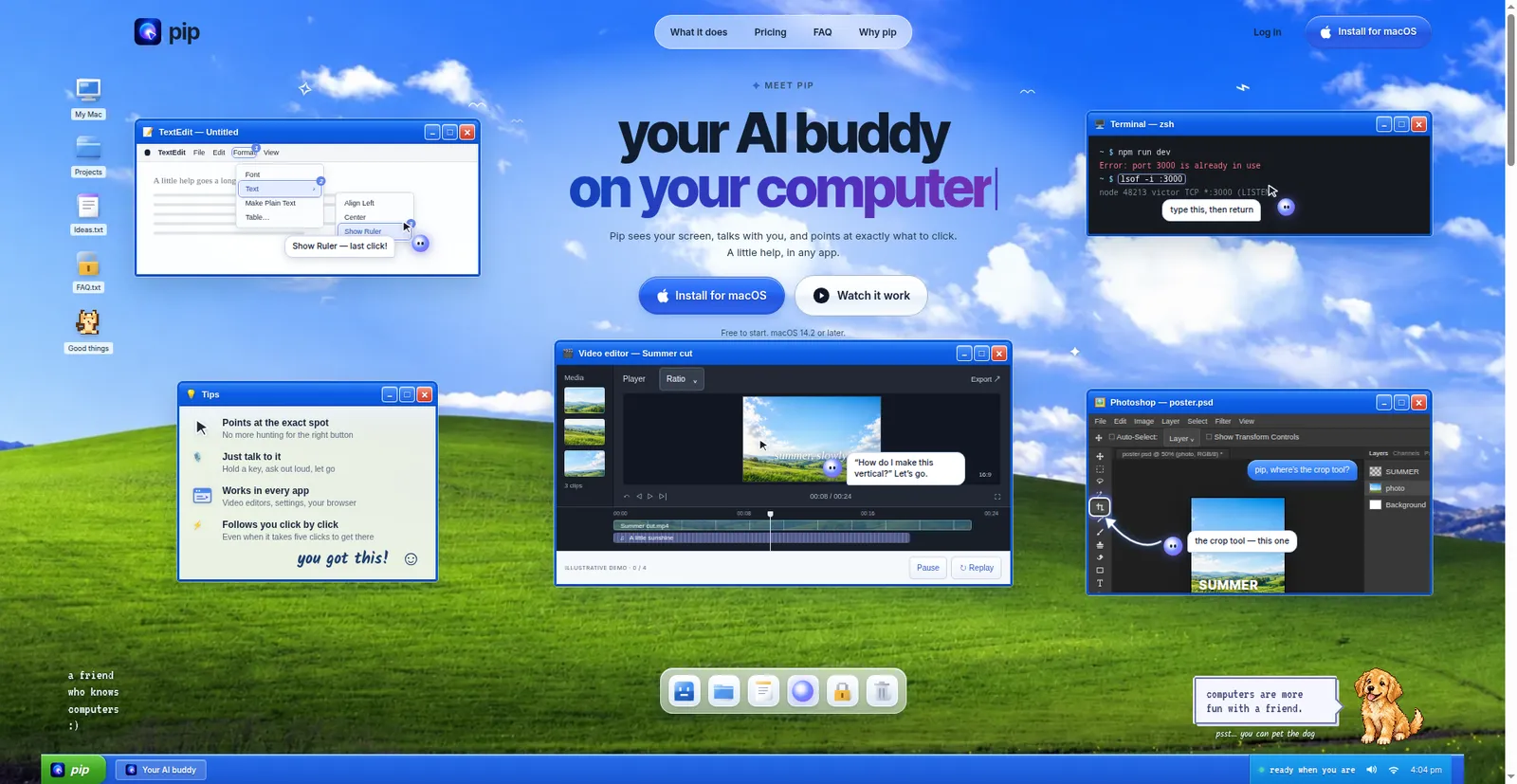
PIP homepage — your computer, finally on your side
1 / 3Overview
What is PIP?
AI buddy on your computer.
Pip is an AI buddy for your Mac. It sees your screen, talks you through it, and points at exactly where to click — even when it takes several clicks. Hold a key and it sees what you're looking at, understands the context, and helps immediately: explaining, pointing at where to click, fixing errors, and walking through tasks.
The goal is to make help feel like someone sitting next to you rather than chatting with a bot. It's voice-first (hold a key, ask out loud, let go), works in every Mac app with no per-app plug-ins, and can also do little things on command — volume, dark mode, timers, reminders, calendar, email — with confirmation before anything sends or deletes.
Free to start with 30 questions/month forever, no card needed (macOS 14.2 or later). Pro is $15/month and Max is $69.99/month.
Platforms and languages
PIP Availability
Platforms
Languages
Capabilities
PIP Key Features
Sees your screen on demand
Hold a key and Pip understands the context of what you're looking at — it only looks when you ask, and screenshots aren't stored.
Points at the exact spot
Circles the on-screen control, tells you what it does, and follows you click by click, even across five clicks.
Voice-first interaction
Hold a key, ask out loud, let go — no chat window to manage; answers come back in a sentence.
Works in every Mac app
Reads the screen like you do — video editors, system settings, browser, terminal — with no per-app plug-ins.
Teaches and does little things
Walks you through tasks, and on command handles volume, dark mode, timers, reminders, calendar, and email; anything that sends or deletes waits for your confirmation.
Best for
Who uses PIP?
Mac users who get stuck in software
Ask out loud about anything on screen and get pointed guidance, click by click
Plans and access
PIP Pricing
Freemium
Free $0/mo (30 questions/mo, forever); Pro $15/mo (300); Max $69.99/mo (1,000); no card to start
Common questions
PIP FAQs
Is it watching my screen all the time?
No — it only looks while you hold the hotkey or type a question, stops after a few quiet seconds, and screenshots are never stored.
Does it click things for me?
No — Pip points, you click. It circles controls, explains what they do, and follows along, so you stay in charge.
Which apps does it work in?
Any app on your Mac — system settings, browsers, video editors, spreadsheets, design tools — with no per-app plug-ins.
What does it cost?
Free is 30 questions/month forever; Pro is $15/month for 300 questions; Max is $69.99/month for 1,000 questions. You can upgrade, switch, or cancel from the Pip menu.
How do I get help?
Email [email protected] about anything — bugs, billing, or deleting your account.
Compare similar tools
PIP Alternatives

Reviews
See what the community thinks and share your experience.
—
Based on 0 ratings
Rating distribution
Community reviews
No reviews
No written reviews yet.