
From Prompt to Your Phone: Build Your Own Android Apps with Google AI Studio
Imagine describing an app in one sentence — "a daily task tracker that saves everything on the phone" — and getting a working Android app you can install on your phone, without writing a single line of code, without Android Studio, and without paying Google's $25 developer registration fee. That is exactly what Google now lets you do: build the app in Google AI Studio with natural language, then launch it on your own device through Google Play as a "personal app."
This is not a concept or a beta teaser. Google announced the personal-app route on October 13, 2026, and it is rolling out now. If you have ever stopped at the edge of an app idea — a rec-league stat tracker, a family chore list — because building an app felt out of reach, this guide walks you through the whole chain, step by step.
What just happened
Google's October 2026 Play Store update introduced a private route from Google AI Studio straight to your own devices. Google AI Studio is Google's free, browser-based workspace for building with its Gemini models. Since May 2026, it has been able to generate native Android apps from prompts — but getting those apps onto a real phone was awkward. You either plugged your phone into a computer with a USB cable and used debugging tools, or you paid the one-time $25 fee for a Google Play developer account and published to a private testing track.
The new route removes both hurdles. Per Google's announcement, you "vibe code" a custom Android app in AI Studio, and Google Play then lets you launch that app on your own device as a personal app. The app stays private, secure, and — in Google's words — "separate from the public store catalog." installable with only your standard Google account: no developer account, no APK files, no developer console. Google's VP and GM of Google Play, Sam Bright, framed it as a shift from "there's an app for that" to "there's an app for me."
The rollout began October 13, 2026, in select markets including the U.S., for users aged 18 and older; Google has not published the full market list. If the feature has not reached your account yet, the steps below still work up to the final install step.
How the whole chain works
Three pieces fit together: Google AI Studio, its coding agent, and the Google Play personal library.
When you describe an app in AI Studio's Build mode, an agent Google calls the Antigravity Agent assembles a complete project. What comes out is not a website dressed up as an app — it is a native Android application written in Kotlin with the Jetpack Compose UI toolkit, the same stack professional Android developers use. Google describes the output as production-quality code following current Jetpack Compose patterns.
You then get a cloud-based Android emulator streamed to your browser, so you can tap, scroll, and try the app immediately without installing Android Studio or the Android SDK. If the app is not quite right, you keep chatting with the agent in the same panel: "make the buttons bigger," "add a dark mode," "save the list between sessions." A Code tab shows the generated code, and you can download the whole project as a ZIP file to continue in Android Studio.
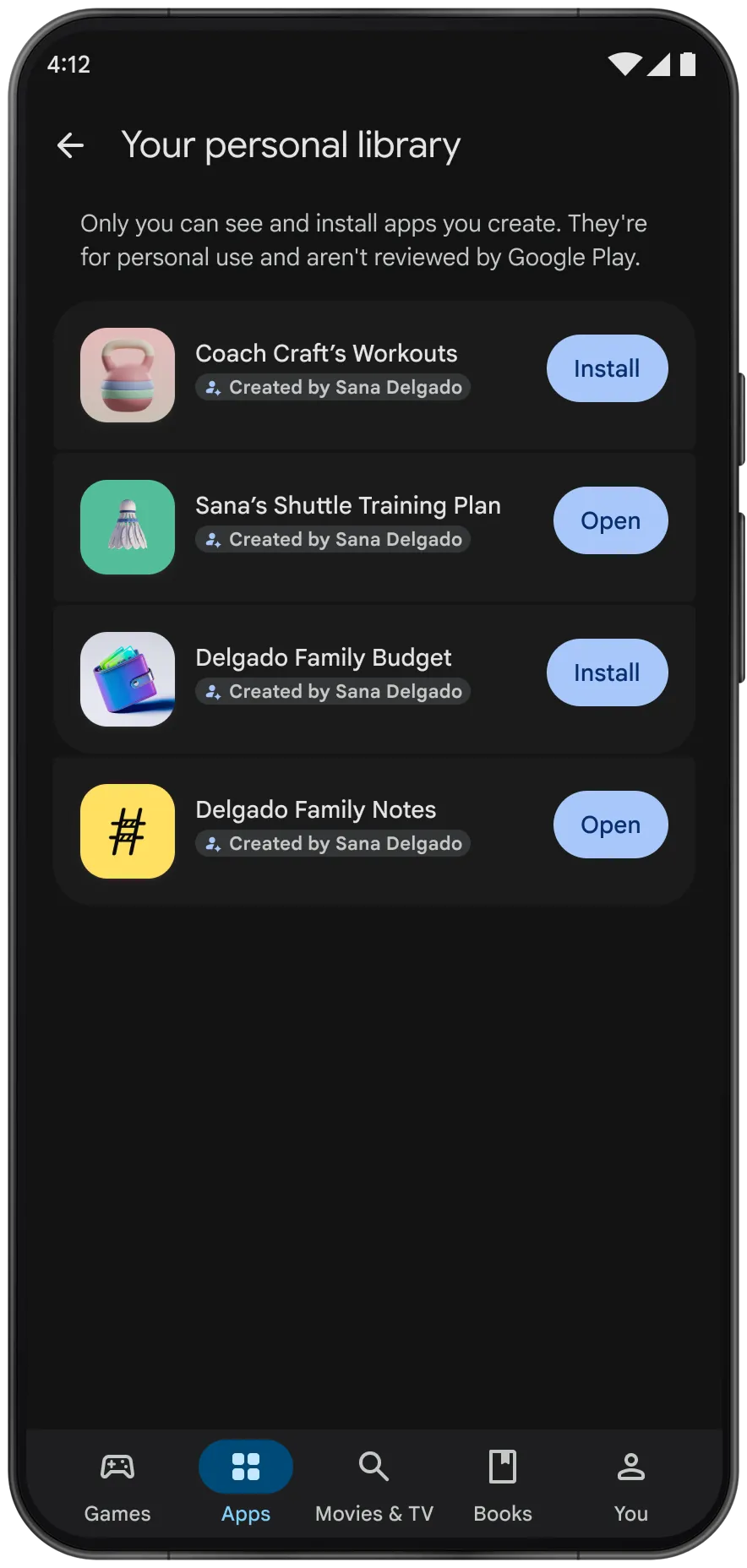
The new part is the last mile: pushing the app from AI Studio creates a "personal library" section in the Play Store client on your devices, and you install it like any other app — except nobody else can see it. Google's preview of the library screen states the rule plainly: "Only you can see and install apps you create. They're for personal use and aren't reviewed by Google Play." Sharing with a close circle of friends and family is promised in the coming months; going public later means graduating to a professional developer account with full Trust & Safety review.
Step-by-step: from a sentence to an app on your phone
Here is the full workflow, as documented in Google's AI Studio docs and the October announcement.
1. Update the Play Store on your phone. Google says the personal-app rollout rides on the latest Google Play Store update. Open the Play Store, check for updates, and make sure you are running the newest version.
2. Open Google AI Studio and switch to Build mode. Go to Google AI Studio in your browser and sign in with your standard Google account — the same one you use on your phone. In the left-hand navigation panel, open Build mode.
3. Select Android as the platform. A platform picker lets you choose what you are building. Select Android.
4. Describe the app you want. Enter a prompt in plain language. Google's own examples: "Create a daily task tracker with local storage" or "Build a simple calculator." A good first prompt might read: "A workout log: exercises with sets, reps, and weight, saved on the phone, big buttons I can tap with sweaty hands."
5. Test it in the browser emulator. The agent generates the project and launches it in a cloud Android emulator inside the browser. Tap around, rotate the screen, try the flows. Note: camera, NFC, Bluetooth, and Play services do not work in the emulator, and GPS is simulated — apps needing those need a real device.
6. Refine with follow-up prompts. This is the vibe-coding loop: describe changes in words and watch it rebuild.
7. Deploy to your phone via Google Play. Once the feature is available in your market, push the app from AI Studio to create your personal library entry, then install it from the Play Store on your phone — the same way you install any app. It sits alongside your downloaded apps but never appears in search or on a store listing.
Fallback routes (if the personal-app option has not reached you yet): the docs describe two older ways. One is a USB cable: enable Developer Options and USB debugging on the phone, connect it to a computer running Chrome or Edge, and click "Install on Device" in AI Studio — WebUSB handles the transfer, no local ADB install needed. The other is publishing to the Play Console's internal testing track, which requires a Google Play developer account (one-time $25 registration fee) and caps distribution at 100 testers.
What you can build — and what you can't
The sweet spot is small, personal, client-side utilities: a stat tracker for a local league, a family organizer, a study quiz, a daily task tracker, a simple calculator. Generated apps can access device features such as the camera, GPS, accelerometer, and Bluetooth, and can integrate with the Gemini API, according to media coverage of the launch.
But know the hard limits from Google's documentation, because they are limits, not bugs: apps are client-side only (no Firebase, secrets management, multiplayer, or Google Workspace APIs), use single-activity, single-module architecture in Kotlin and Jetpack Compose only (no Java, XML layouts, or NDK), target phones and tablets only (no Wear OS or Android TV), and export as ZIP download only.
In practical terms: if your idea needs user accounts, a shared database, or real-time sync between devices, this is not the tool. If it is a self-contained app that lives on one phone, it fits.
Pros and limitations, honestly weighed
What is genuinely good here. The cost barrier is gone: building and installing a personal app requires no $25 fee and no developer account. The skill barrier is gone too — you never need to open Android Studio, install an SDK, or read Kotlin. The output is native, not a web wrapper, so it behaves like a real app. And the personal library solves management: reinstall across your devices and restore on a new phone through Google's own system.
What to watch. First, availability: select markets including the U.S., 18+, with no published full list or timetable. Second, review status: personal apps "aren't reviewed by Google Play" — a feature for private use, but it means trusting AI-generated code on your own device, so keep to low-stakes data. Third, sharing: only you can install your app for now; friends-and-family sharing is promised "in the coming months" with no firm date. Fourth, quotas: Google calls the route free with a standard Google account, but I found no published rate limits specifically for the Android builder.
Build for yourself now; plan a public release separately.
Wrap-up
Google's October 2026 move closes the loop that vibe coding was missing: the tool that generates the app and the store that puts it on your phone are now one continuous flow. Describe the app in Google AI Studio, refine it in the browser emulator, and install it from your own Play Store personal library — no code, no developer account, no $25 fee.
Start small: turn one personal annoyance into a paragraph. And if your market does not have the feature yet, the USB route still gets the app on your phone today.
Sources
- Google (The Keyword), "New on Google Play: More ways to create, discover, and play" — official announcement, October 13, 2026: https://blog.google/products-and-platforms/platforms/google-play/google-play-updates-october-2026/
- Google AI for Developers documentation, "Build Android apps in Google AI Studio": https://ai.google.dev/gemini-api/docs/aistudio-android?hl=en
- TechMyMoney, "Google AI Studio Apps Install on Your Own Android Devices" — October 14, 2026: https://techmymoney.com/2026/10/14/google-ai-studio-apps-install-own-android-devices-play-store/