Free open-source macOS dashboard that runs Claude Code, Codex CLI and Gemini CLI side by side in one sidebar.
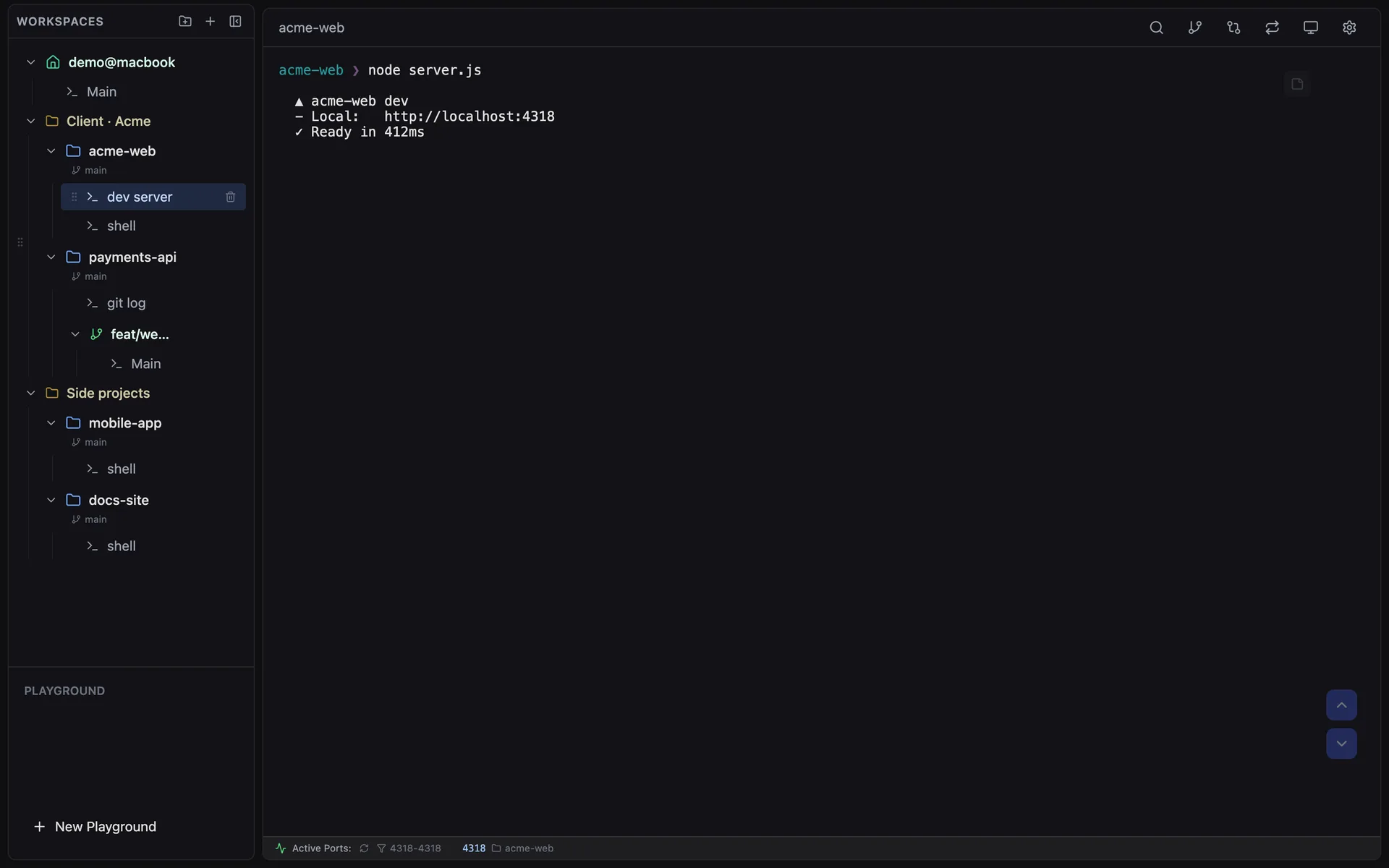
Dashboard with workspaces and sessions
1 / 2Overview
What is CLI Manager?
Your CLI Agents, All in One Place.
CLI Manager is a free, open-source (MIT) macOS dashboard for running AI coding agents. Claude Code, Codex CLI and Gemini CLI live side by side in one sidebar, so developers can organize projects and git worktrees, rename sessions, and jump to an editor in one click instead of juggling separate terminal windows. The AI Control API (REST + MCP, local only, off by default) lets one AI agent open sessions, send prompts, wait and read the screen in terminals the user can watch, with a Disconnect AI button to take control back at any time. Sessions stay alive while navigating, memos auto-save per session, split view shows terminals side by side, and port monitoring surfaces local dev servers. Download the macOS app from GitHub Releases or build it from source.
Platforms and languages
CLI Manager Availability
Platforms
Languages
Capabilities
CLI Manager Key Features
AI Control API
One AI agent can open sessions, send prompts, wait and read the screen in terminals you can watch; Disconnect AI hands control back instantly. Local only, off by default.
All CLI agents, one dashboard
Claude Code, Codex CLI and Gemini CLI in one sidebar with custom names and roles for multi-agent workflows.
Git worktree workspaces
Create git worktrees from the UI; each becomes its own workspace with independent sessions and branch tracking.
Session persistence and memos
Every terminal session stays alive while navigating, with auto-saving per-session memo pads for context and notes.
Split view and port monitoring
View two terminals side by side, and see active local dev servers with one-click kill.
Best for
Who uses CLI Manager?
Software developers
Run and organize multiple AI coding CLI agents in one dashboard
Developers using AI agents
Let one AI agent orchestrate other CLI agents in watchable terminals
Plans and access
CLI Manager Pricing
Free
Common questions
CLI Manager FAQs
Is CLI Manager free?
Yes. It is free to use and open source under the MIT license, with downloads from GitHub Releases.
Which AI agents does it manage?
Claude Code, Codex CLI and Gemini CLI, all managed from one sidebar with named sessions and workspaces.
What does the AI Control API do?
It lets an AI agent open sessions, send prompts, wait and read the screen in terminals you can watch. It is local-only and off by default, and you can disconnect the AI and take over at any time.
Does it work on Windows or Linux?
No. It is macOS only, with Apple Silicon and Intel builds.
Do sessions stay alive when I switch between them?
Yes. Every terminal session stays alive while you navigate, so switching between sessions loses no output.
Reviews
See what the community thinks and share your experience.
—
Based on 0 ratings
Rating distribution
Community reviews
No reviews
No written reviews yet.