Cliphi
AI clip maker for your podcasts and livestreams: short clips with auto captions
Paste your video's link or upload it. Cliphi finds the strongest moments and cuts each one into a vertical clip with captions, ready to post or schedule.
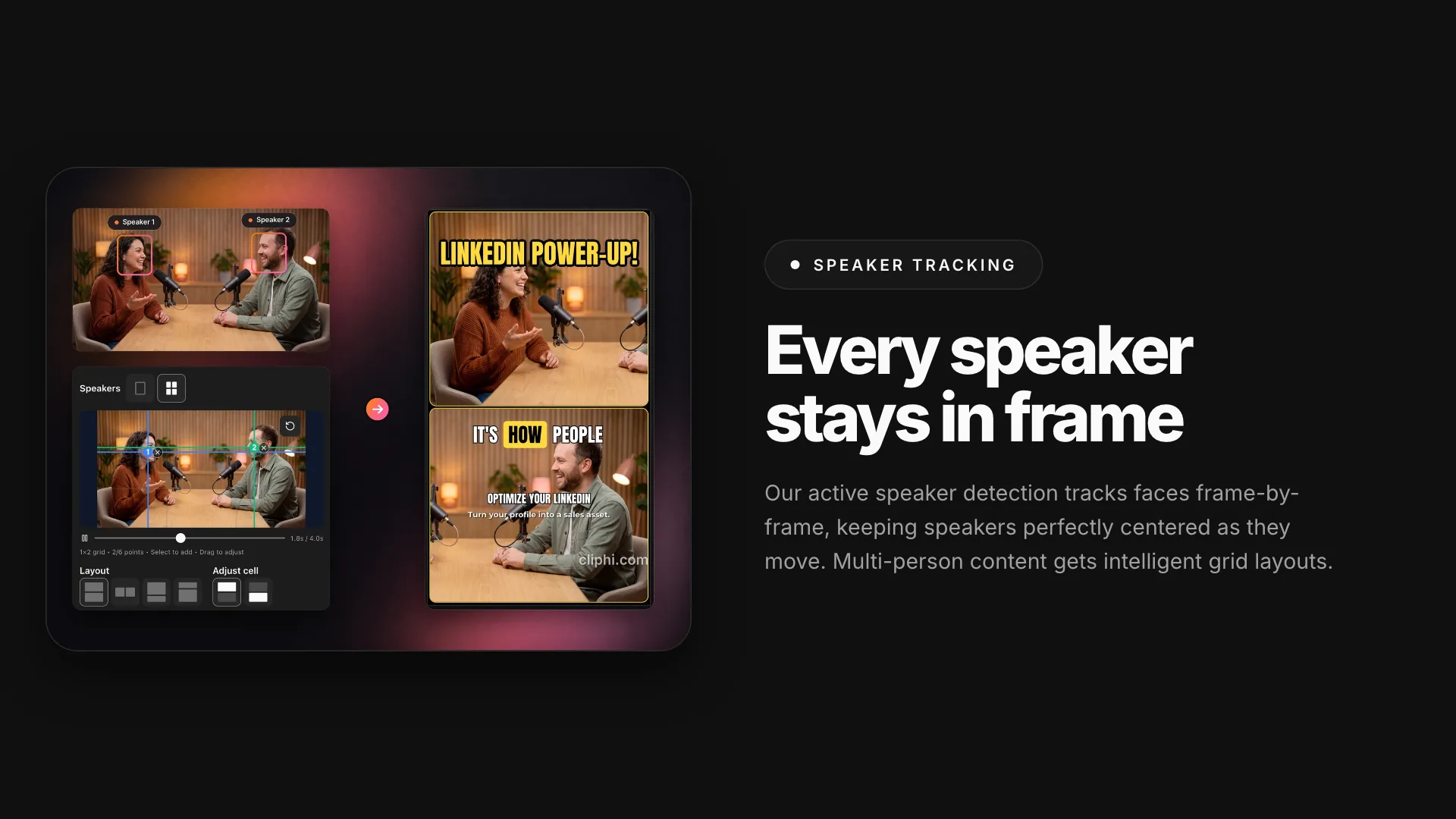
Speaker tracking keeps the person talking in frame when the clip turns vertical
1 / 3Overview
What is Cliphi?
AI clip maker for your podcasts and livestreams: short clips with auto captions
Finding the good parts of a long video by hand means scrubbing through all of it. Paste your video's link or upload it from your phone or computer, and Cliphi transcribes the whole thing and picks the moments a new viewer could follow. Each one becomes a vertical clip with a virality score for how well it stands on its own.
It's made for podcasts, livestreams, interviews, webinars, tutorials and talking-head videos.
Each clip can have:
- Captions that light up word by word, in styles from clean to loud
- Speaker tracking that keeps the person talking in the shot
- A title and a short on-screen hook written by AI, both editable
- Captions and on-screen text in 47 languages
- Background music from the library, or a track made by AI
- Your logo, fonts, colors and intro
Want more from the same video? Describe what you're after, like "funny moments" or "key insights", and Cliphi looks for more clips.
If you stream, paste your live stream's link and clips start arriving while you're still on air.
Preview every clip, then render the ones you want to keep. Post them to YouTube Shorts, TikTok, Instagram Reels (Business or Creator accounts), Facebook Pages, Threads and X, or schedule them for later. Your scheduled and published posts sit in one list.
On the web you can also record your face or voice over a clip, and the clip's own sound drops under your voice. Supercuts pull the moments on one theme into a single highlight reel.
Every plan includes every feature. Processing uses 1 credit per minute of video, and rendering uses 0.25 credits per second of finished clip. Translating a clip or making an AI music track uses credits too. So does posting to X. Credits never expire, and you can cancel anytime.
Cliphi works in the browser, and there's an Android app on Google Play. Use it with videos you own or have the rights to use.
Platforms and languages
Cliphi Availability
Platforms
Languages
Capabilities
Cliphi Key Features
AI finds the strongest moments in your long video and gives each a virality score
Paste your video's link or upload it from your phone or computer, and Cliphi transcribes the whole thing and picks the moments a new viewer could follow. Every clip comes with a virality score for how well it stands on its own, so you know what to post first.
Word-by-word captions, plus an AI-written title and on-screen hook you can edit
Captions light up word by word as people speak, in styles from clean to loud. AI writes a title and a short on-screen hook from what was said, and you can edit them or write your own.
Speaker tracking keeps the person talking in frame when the clip turns vertical
Speaker tracking keeps the person talking in the shot when the clip turns vertical. Clips come in 9:16 for Shorts and Reels, with square and wide versions too. You can also set the crop by hand.
Translate a clip's captions and on-screen text into 47 languages
Translate a clip's captions and on-screen text into 47 languages, while the original audio stays the same.
Background music from the library, or an AI track made for the clip
Add background music from the library, or let AI make a track that fits the clip.
Clips from your live stream arrive while you're still on air
If you stream, paste your live stream's link and clips start arriving while you're still on air.
Your logo, fonts, colors and intro on every clip, set once
Set your logo, fonts, colors, background, intro and outro once, and every clip carries them.
Post or schedule to YouTube Shorts, TikTok, Instagram Reels, Facebook, Threads and X
Post clips now or schedule them for YouTube Shorts, TikTok, Instagram Reels (Business or Creator accounts), Facebook Pages, Threads and X.
Best for
Who uses Cliphi?
Podcasters
Turn one podcast episode into a week of short clips
Livestreamers
Clip a livestream while it's still running and post the highlights
Gaming creators
Make a themed highlight reel from one long video
Educators and coaches
Record your face or voice over a clip to react or explain
Marketers who run webinars
Repurpose webinars and interviews into vertical clips for social media
Plans and access
Cliphi Pricing
Paid
$4.99/month
Plans from $4.99 a month. Finding clips costs 1 credit per minute of video, and rendering costs 0.25 credits per second of finished clip. Credits never expire.
Common questions
Cliphi FAQs
What is Cliphi?
An AI clip maker for people who make long videos. Give it a podcast episode or a stream, and it hands back vertical clips of the moments that work on their own, with captions already on. You pick which ones to render, then post or schedule them from Cliphi.
What videos can I use?
Your own long videos, like podcasts, livestreams, interviews, webinars and tutorials. Paste your video's link, or upload a file from your phone or computer. Use videos you own or have the rights to use.
How much does Cliphi cost?
Plans start at $4.99 a month for 1,200 credits, and every plan has every feature. Processing uses 1 credit per minute of video, and rendering 0.25 credits per second of finished clip. Translating a clip or making an AI music track uses credits too. So does posting to X. Credits never expire.
Do I need editing skills?
No. Cliphi picks the moments and handles the captions and framing. If you want to change the words, style, crop, music or length, the editor does that before you render. Once a clip is rendered, it's ready to post.
Where can I post my clips?
Connect your accounts and post now or schedule for later to YouTube Shorts, TikTok, Instagram Reels (Business or Creator accounts), Facebook Pages, Threads and X. You can also export your finished clips to your phone or computer.
Compare similar tools
Cliphi Alternatives
 DescriptAI video and audio editor: edit media by editing the transcript text, with AI co-editing, dubbing, and clips.AI Video CreationAI Audio EditingAI Transcriptionvideo editingtranscriptiondubbing
Reviews
See what the community thinks and share your experience.
—
Based on 0 ratings
Rating distribution
Community reviews
No reviews
No written reviews yet.