Record with a floating script, generate local captions, and cut video by deleting transcript sentences.
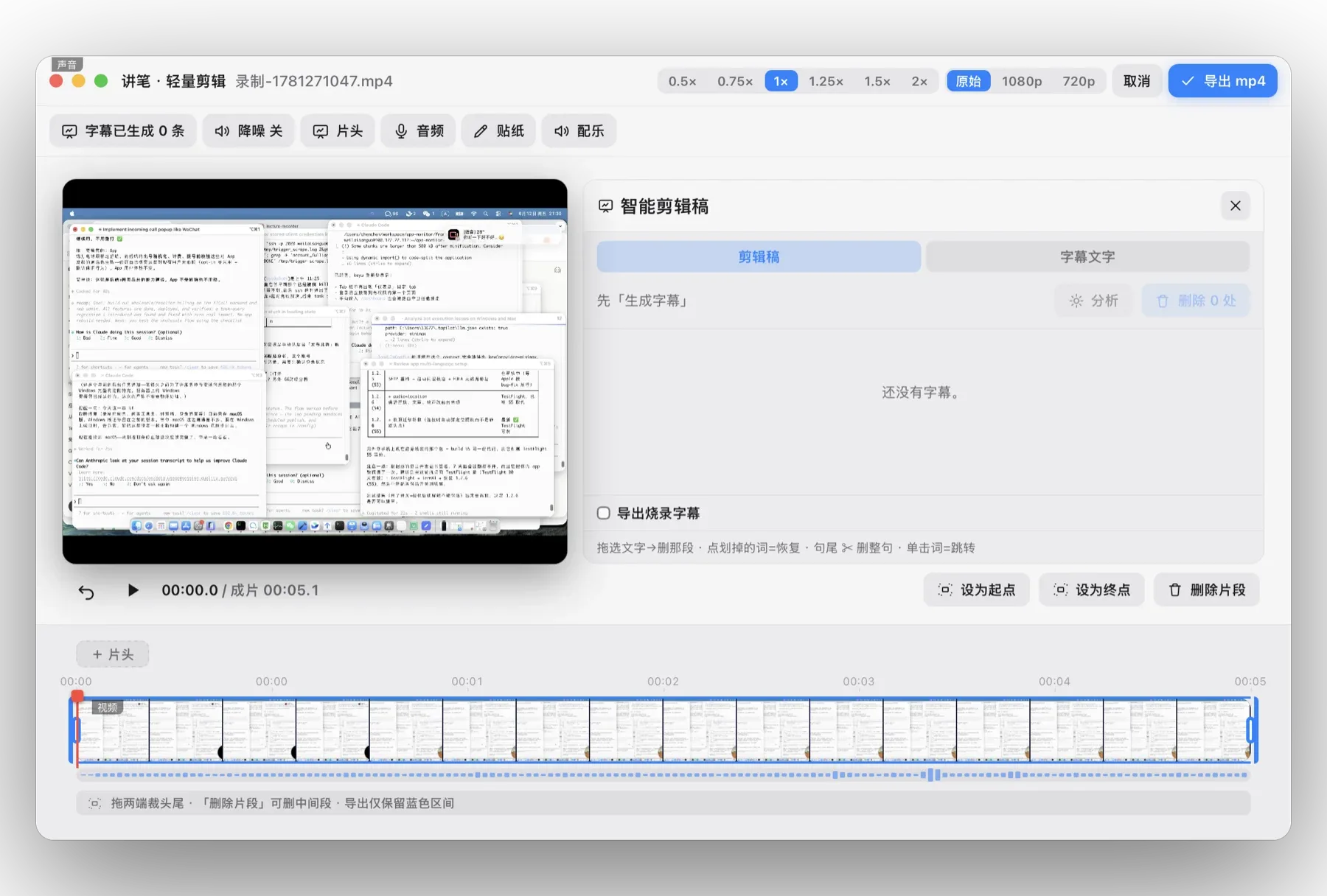
Lecta desktop editor with a video preview, transcript and timeline (Chinese interface)
Overview
What is 讲笔 (Lecta)?
提词、录制与文字剪辑:边看稿边录,像改文稿一样剪视频。
What is Lecta?
Lecta (讲笔, also branded Penbeam in English) is desktop software for script prompting, screen and camera recording, and transcript-based video editing. This listing links to the Chinese official website at lecta.cc.
Workflow
Record a screen or region with a camera and annotations. Keep a floating script nearby with adjustable font size and scrolling speed. Download the speech model on first use, then generate captions locally. Delete unwanted transcript sentences to cut matching video segments and preview the result before exporting.
Requirements and limits
Mac: Apple Silicon, macOS 12.3 or later. Windows: Windows 10 or later. Features vary by platform and version. The supplied editor screenshot has a Chinese interface. Review transcription accuracy and cut boundaries; the app does not promise perfect automatic editing or desktop voice-follow prompting.
Pricing
The desktop free tier allows up to 10 minutes per recording, watermarked export and up to 1080p. Optional Pro access is CNY 68/month, 398/year or 898 lifetime; current terms are on the official pricing page. A separate phone app focuses on prompting and camera recording.
Platforms and languages
讲笔 (Lecta) Availability
Platforms
Languages
Capabilities
讲笔 (Lecta) Key Features
Local transcription and captions
Download the speech model on first use, then generate captions on your computer.
Transcript-based video cuts
Delete an unwanted transcript sentence to cut its matching video segment. Preview cut boundaries before export.
Screen, camera and floating script
Record a screen or region with camera and annotations. Keep a floating script nearby with adjustable font size and scrolling speed. Platform capabilities vary.
Plans and access
讲笔 (Lecta) Pricing
Freemium
Desktop free tier: up to 10 minutes per recording, watermark and 1080p export. Optional Pro: CNY 68/month, CNY 398/year or CNY 898 lifetime. Fixed-term access via one-time Alipay payment, not automatic renewal. Check the official pricing page for current terms.
Common questions
讲笔 (Lecta) FAQs
讲笔 (Lecta) Alternatives
 DescriptAI video and audio editor: edit media by editing the transcript text, with AI co-editing, dubbing, and clips.
Reviews
See what the community thinks and share your experience.
—
Based on 0 ratings
Rating distribution
Community reviews
No reviews
No written reviews yet.