开源的内部 AI 智能体框架:团队共享知识库、复用工作流,支持细粒度工具权限管控
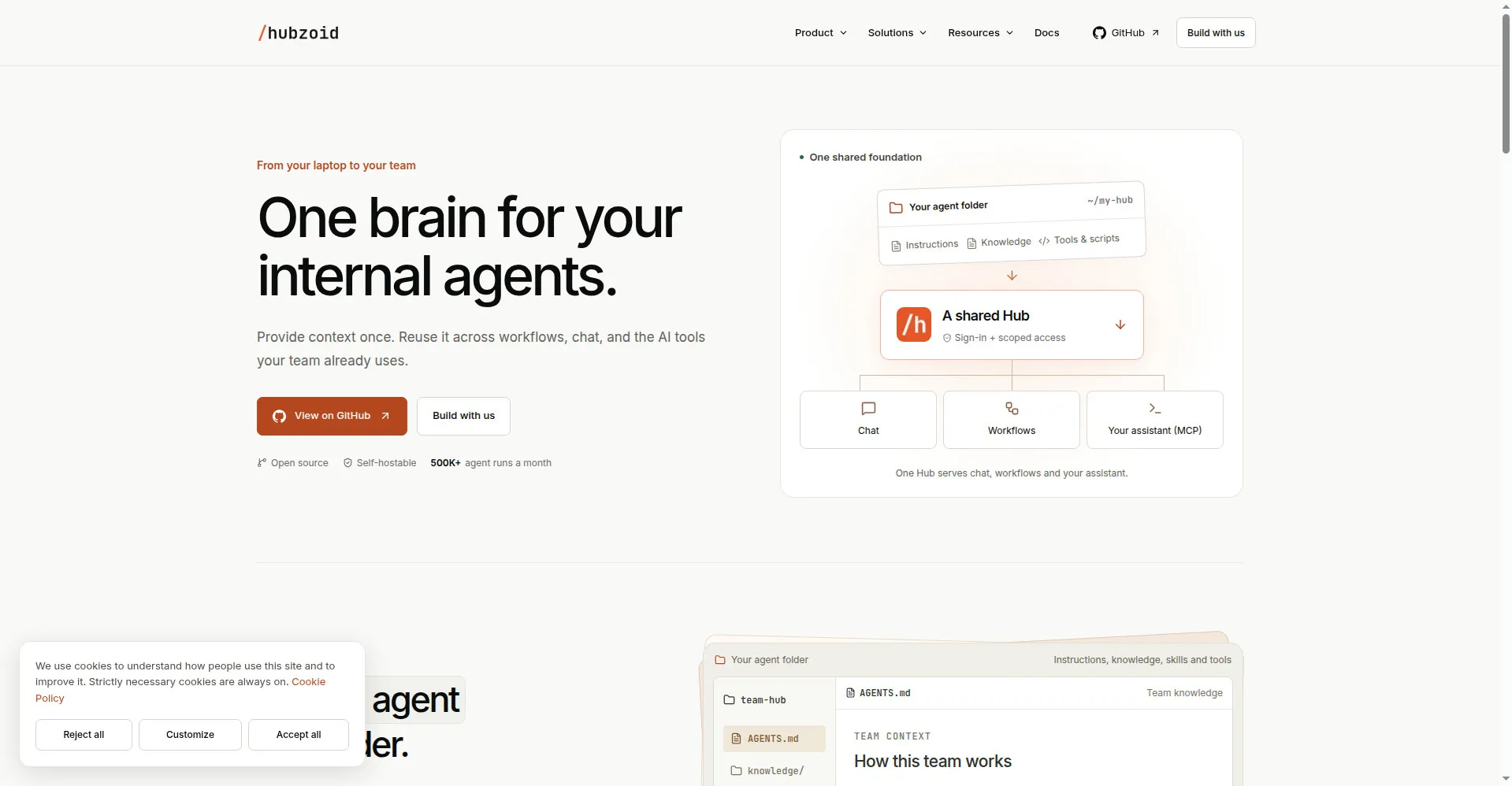
Hubzoid homepage — one brain for your internal agents
1 / 3Overview
What is Hubzoid?
Open-source framework for your internal AI agents
Hubzoid is an open-source framework for building internal AI agents that your whole team can rely on. Instead of every agent carrying its own scattered context, Hubzoid keeps instructions, knowledge, skills and tools in one shared Hub — plain files you can version in Git and reuse across chat, workflows and your existing AI assistants.
The Hub is the shared foundation for a team or company: one place to define how agents should work, what they may access and which tools they can call. Teams use it through chat in the channels they already use (web, Slack, WhatsApp, Telegram), turn repeated work into scheduled or on-demand workflows, and plug the Hub's context into assistants like Claude Code, Codex and Hermes via MCP — keeping the assistant you already use, with your team's knowledge behind it.
Security is built in rather than bolted on. A Console shows agent runs and lets you set who can use an agent and which tools they may call; permission checks run as deterministic code before any restricted tool executes, so no prompt or pasted instruction can widen access. Hubzoid is open source under Apache 2.0 and self-hostable: you choose the models, the integrations and where it runs, and your data stays in your own deployment. The team also offers "Build with us" services, quoted per project, for teams that want the first Hub built together with them.
Platforms and languages
Hubzoid Availability
Platforms
Languages
Capabilities
Hubzoid Key Features
Shared Hub
One folder holds your team's instructions, knowledge, skills and tools. Version it in Git and reuse the same context across chat, workflows and MCP.
Team Chat
Ask questions and request actions from web chat, Slack, WhatsApp or Telegram, with your business context and sources close to the answer.
Workflows
Turn recurring work into defined workflows that run on demand or on a schedule, with a clear place for human review when it matters.
MCP Connections
Bring the Hub's shared context and authorized tools into Claude Code, Codex and Hermes through MCP — keep the assistant you already use.
Console & Access Control
A Console to inspect agent runs, plus fine-grained permissions: choose who can use an agent and which tools they may call. Checks run before any tool executes.
Open Source & Self-Hosted
Apache 2.0 licensed and self-hostable. You choose the models, the integrations and where it runs; your data stays in your deployment.
Best for
Who uses Hubzoid?
Teams and companies that want to run internal AI agents
Give every agent and chat channel the same shared context, with strict control over who may use which tools.
Plans and access
Hubzoid Pricing
Free
Framework is free (Apache 2.0); custom build services billed per project.
Common questions
Hubzoid FAQs
How much does Hubzoid cost?
The framework itself is free and open source under Apache 2.0 — you can self-host it on your own infrastructure at no license cost. If you want the Hubzoid team to build with you, the optional "Build with us" service is quoted per project.
Who operates Hubzoid after setup?
Your own team. Hubzoid is self-hostable by design: you set up the Hub, connect your channels and models, and run it on infrastructure you control. The Hubzoid team can help with the first build through a per-project service.
Where does Hubzoid run, and which AI models does it use?
Wherever you choose — your own cloud or servers. You also pick the models: Hubzoid connects your existing assistants (Claude Code, Codex, Hermes) via MCP, so your data stays in your deployment.
How does Hubzoid handle data security?
Your data stays in your own deployment, and access is enforced by deterministic code: before a restricted tool runs, Hubzoid checks the person's grants, so a persuasive prompt cannot change the answer. A Console lets you review runs and set who may use each agent and tool.
Which systems can I connect to Hubzoid?
Team chat in web, Slack, WhatsApp and Telegram, plus your existing AI assistants through MCP (Claude Code, Codex, Hermes). Knowledge and tools defined once in the Hub are reused everywhere.
Reviews
See what the community thinks and share your experience.
—
Based on 0 ratings
Rating distribution
Community reviews
No reviews
No written reviews yet.