Windows voice companion that watches your screen and points to the exact button, explains on a side board, or completes steps.
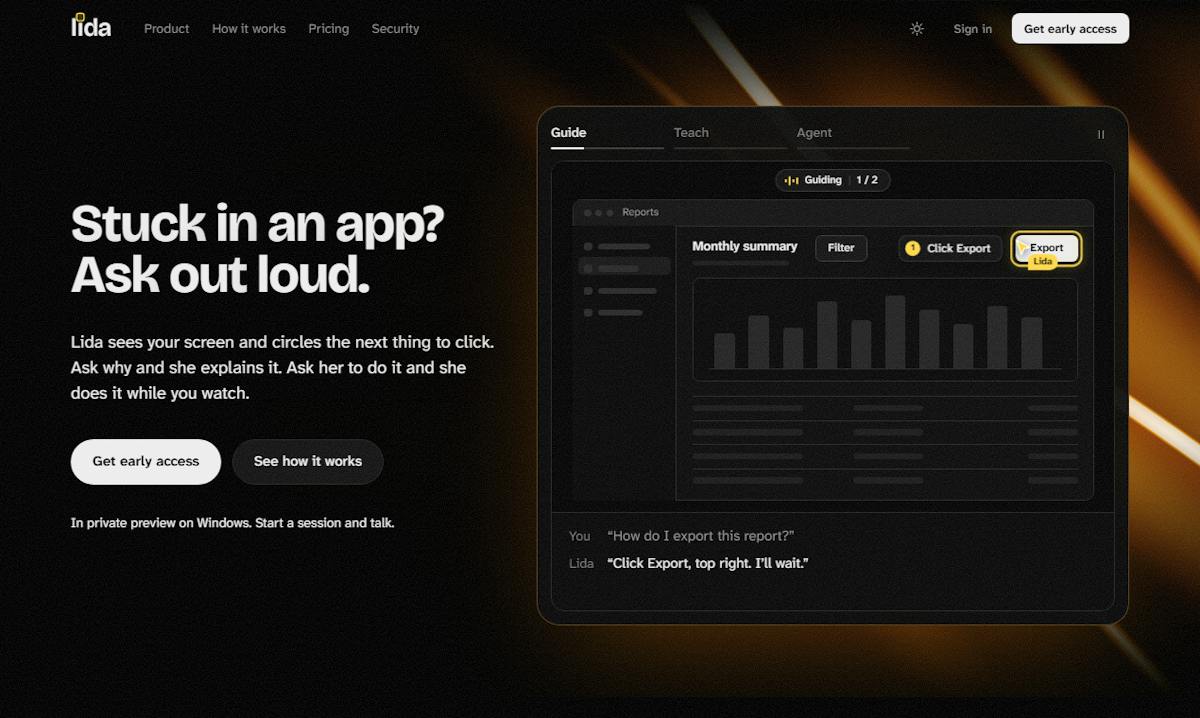
Lida Product Hunt gallery image 1
1 / 2Overview
What is Lida?
Stuck? Just ask. Lida shows you how.
Lida is a Windows desktop companion you talk to out loud. Instead of living in a chat box, she lives on your screen: she sees the app you are in and answers by voice, pointing at the exact thing to click.
Key capabilities:
- Guide: she highlights the next step on your screen, one step at a time.
- Teach: she explains the idea on a board beside your work while she talks.
- Agent: she does the task while you watch, and asks before anything risky like sending or deleting.
- No screenshots, no copy-paste, no tab juggling: just say show me how, teach me, or do it.
- Trust comes first: one key silences her, grabbing the mouse stops her, and her overlay stays hidden from screen recordings.
Lida is in private preview on Windows.
Platforms and languages
Lida Availability
Platforms
Languages
Capabilities
Lida Key Features
Guide mode
Lida highlights the next step on your screen, one step at a time, pointing at the exact thing to click.
Teach mode
Lida explains the idea on a board beside your work while she talks, so you learn instead of just getting it done.
Agent mode
Lida does the task while you watch, and asks before anything risky like sending or deleting.
Voice-first help
Talk to Lida out loud; she sees the app you are in and answers by voice, with no screenshots or copy-paste.
Trust controls
One key silences her, grabbing the mouse while she acts stops her, and she only remembers what you approve.
Best for
Who uses Lida?
Windows users who get stuck in unfamiliar apps
Ask out loud and get on-screen guidance, an explanation, or hands-on help with a task
Plans and access
Lida Pricing
Free
In private preview on Windows
Common questions
Lida FAQs
How is Lida different from a chatbot?
Chatbots live in a chat box. Lida lives on your screen, sees the app you are in, and points at the exact button to click.
Can Lida do tasks for me, or only show me?
Both. Guide mode highlights each step, Teach mode explains on a side board, and Agent mode does the task while you watch.
Does Lida act without asking?
She asks before anything risky like sending or deleting, and grabbing the mouse while she acts stops her.
Which platform does Lida run on?
Lida is in private preview on Windows.
Reviews
See what the community thinks and share your experience.
—
Based on 0 ratings
Rating distribution
Community reviews
No reviews
No written reviews yet.