Tattoo Simulator
Compare your artwork on a body photo before a tattoo discussion.
Preview your own tattoo artwork on a body photo
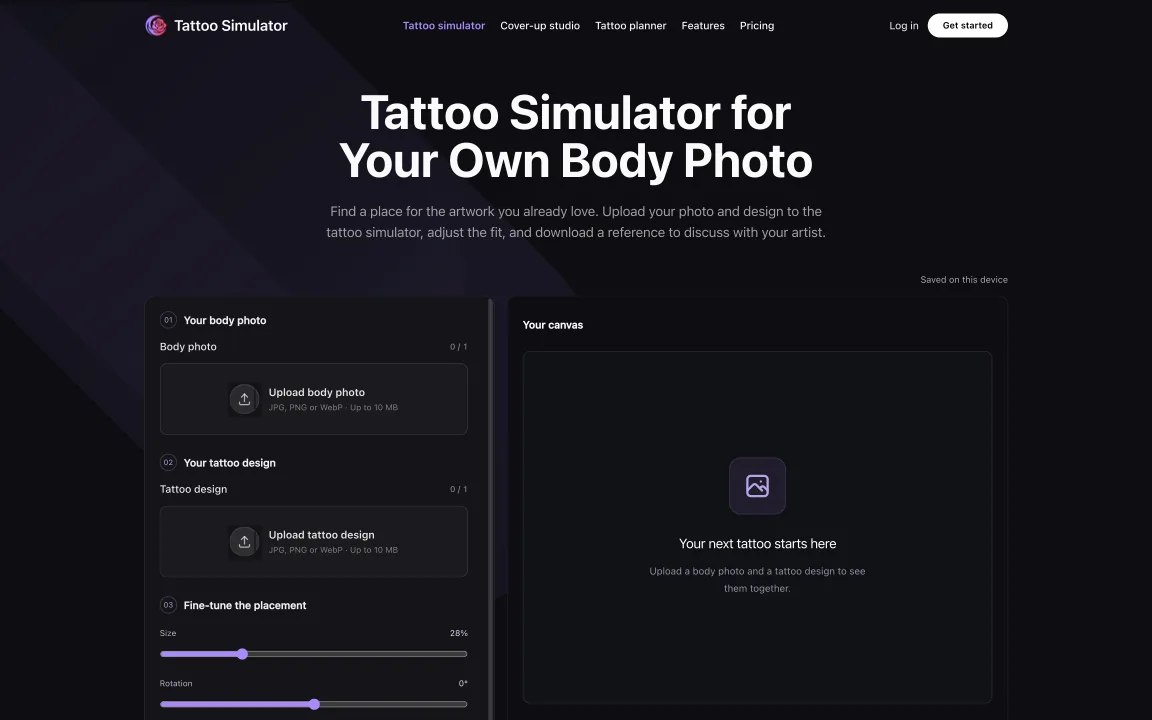
Tattoo Simulator homepage and placement workspace
Overview
What is Tattoo Simulator?
Compare your artwork on a body photo before a tattoo discussion.
Plan a placement reference
Tattoo Simulator is a browser-based workspace for trying your own artwork on a body photo before discussing an idea with a tattoo artist. At https://tattoosimulator.org/ you can bring a separate design and photograph together, then reposition and resize the overlay to compare possible placements.
Adjust and export
The placement controls include rotation, opacity, mirror and reset. A PNG export lets you keep a reference for a conversation or a later comparison. The image is a planning aid, not a promise of how ink will look on skin, how a tattoo will heal, or what a professional will recommend.
What AI does and does not do
The local placement and export workflow does not call AI or consume generation credits. A separate paid AI cover-concept feature exists for exploring concepts. It is distinct from moving an uploaded design over a photograph; output still needs human review.
A practical way to use it
Start with a body photo you have permission to use and artwork you have the right to handle. Try a few scales and orientations, label the versions that matter to you, and share a selected reference only with the people involved in the discussion. A fictional example would be comparing a small botanical design on the outer forearm with a larger version at the same angle. The software does not establish consent to share an image or replace an artist's assessment.
Project disclosure: this listing is associated with Tattoo Simulator, and AI assisted in drafting the description. Confirm current features and prices on the site; no independent testing or endorsement is implied.
Platforms and languages
Tattoo Simulator Availability
Platforms
Languages
Capabilities
Tattoo Simulator Key Features
Position a design on your photo
Upload a body photo and separate artwork, then adjust position, size, rotation and opacity before exporting a PNG reference.
Plans and access
Tattoo Simulator Pricing
Freemium
The local placement and PNG export workflow does not use generation credits. A separate AI cover-concept feature is paid.
Compare similar tools
Tattoo Simulator Alternatives

Reviews
See what the community thinks and share your experience.
—
Based on 0 ratings
Rating distribution
Community reviews
No reviews
No written reviews yet.