Design and preview custom wrap ideas for Tesla vehicles with Tesla Wrap Studio.
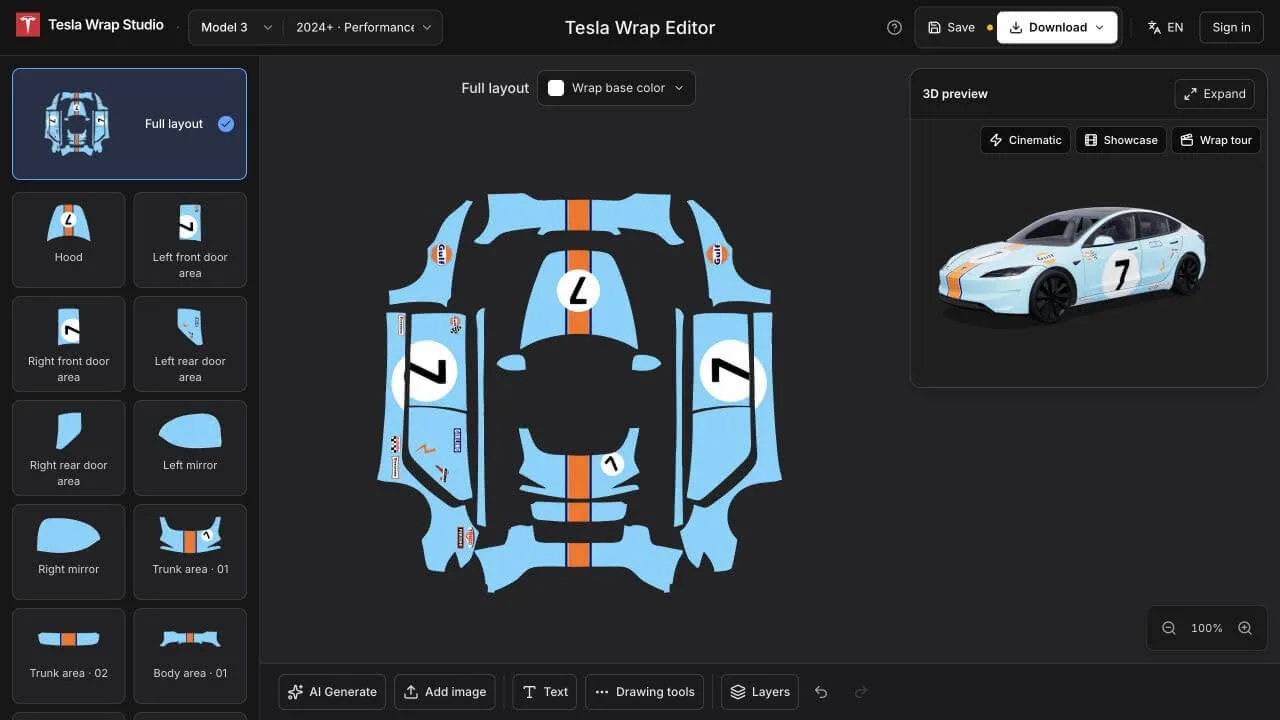
Tesla Wrap Studio 2D editor and 3D preview
Overview
What is Tesla Wrap Studio?
Find or Create Tesla Wraps. See Every Panel in 3D.
Tesla Wrap Studio is an online wrap design tool for Tesla owners. Explore colors and patterns, create your own design, and see how it looks on your vehicle in 3D.
Create your design in 2D using vehicle templates. Preview your design on a 3D vehicle model. Download a PNG for Tesla Paint Shop and images of your 3D preview.
Tesla Wrap Studio is an independent project, not affiliated with or endorsed by Tesla, Inc.
Platforms and languages
Tesla Wrap Studio Availability
Platforms
Languages
Product video
Tesla Wrap Studio in action
Capabilities
Tesla Wrap Studio Key Features
2D vehicle template editor
Create your design in 2D using vehicle templates, with colors, text, brushes and shapes.
3D preview and PNG export
Preview the design on a 3D vehicle model, then download a Tesla Paint Shop PNG and images of your 3D preview.
AI wrap creation and editing
Create wraps from text or a reference image, extend designs to the rest of the vehicle, and harmonize style and colors. AI features require membership and AI credits.
Best for
Who uses Tesla Wrap Studio?
Tesla owners
Explore colors and patterns, create or download a wrap design, preview it in 3D, and export a PNG for Tesla Paint Shop.
Plans and access
Tesla Wrap Studio Pricing
Freemium
$4.99 one-time payment
Free basic editing, 3D preview, and design and preview image downloads; no registration required for free features. Paid membership unlocks image upload and replacement, cloud saving, and AI generation and editing. One-time packages: $4.99 with 5 AI generations, $9.99 with 15, and $19.99 with 50. No subscription or automatic renewal.
Tesla Wrap Studio Alternatives

Reviews
See what the community thinks and share your experience.
—
Based on 0 ratings
Rating distribution
Community reviews
No reviews
No written reviews yet.