A native Mac Markdown reader and editor that turns agent-written specs into a pull-request-style review loop.
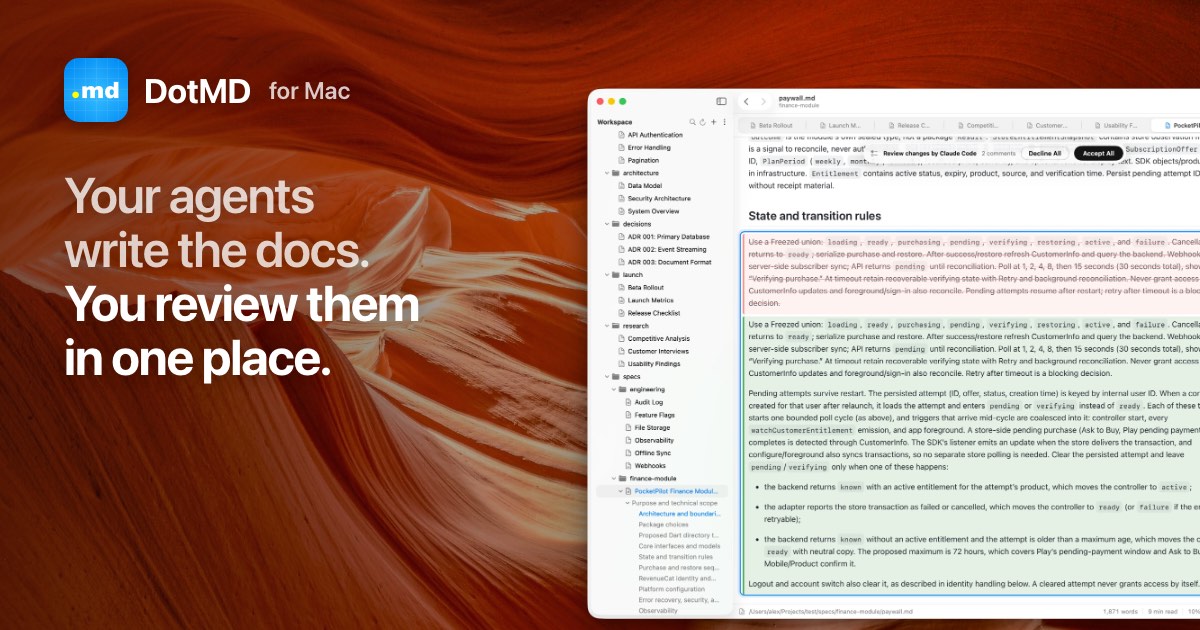
DotMD homepage
1 / 2Overview
What is DotMD?
Review your AI agent's Markdown specs like a pull request
DotMD is a native Mac Markdown viewer and editor where reviewing an AI agent's document works like a pull request. Reading is free; the agent sends you its spec or plan over MCP and waits while you review it.
Key capabilities:
- Passage comments — Select a passage, say what should change, and the comment stays tied to that passage and its line numbers.
- Agent review loop over MCP — The agent reads your comments, fixes them, and each fix shows up where your comment was, old text in red and new in green. Accept it or send it back.
- Needs You queue — Every file where an agent waits for you or fixes wait to be checked is listed at the top of the sidebar, with a Dock badge count.
- Version history for every file — A version is kept whenever anyone changes the file, so you can compare, revert one block or restore the whole file.
- GitHub-like reading — Tables, code highlighting, Mermaid diagrams, KaTeX formulas, callouts, footnotes and front matter, plus search across folders and PDF export.
Everything stays on your Mac: no account, no cloud, and the MCP server listens on localhost only. Works with Claude Code, Codex, Cursor, VS Code and other MCP clients.
Platforms and languages
DotMD Availability
Platforms
Languages
Capabilities
DotMD Key Features
Passage-level comments
Comment on the exact passage; the comment stays tied to its lines while the agent fixes it.
Pull-request-style agent review
The agent sends a file over MCP, reads your comments and fixes them; each fix shows as a diff to accept or reopen.
Needs You review queue
Files waiting on you or on fix checks are listed first, with a Dock badge count.
Version history for every file
Every change by you, an agent or git is kept; compare versions, revert a block or restore a file.
GitHub-like Markdown reading
Tables, code, Mermaid, math, callouts and front matter, with folder search and PDF export.
Best for
Who uses DotMD?
Developers who write specs and plans with Claude Code, Codex or Cursor
review agent-written Markdown line by line instead of in a chat thread
Mac users who read and edit Markdown daily
read rendered Markdown with diagrams and formulas and export to PDF
Plans and access
DotMD Pricing
Freemium
Reading free; Pro $19.99/year or $49.99 lifetime, 3-day free trial.
Common questions
DotMD FAQs
Which AI agents work with DotMD?
Any MCP client: Claude Code, Codex, Cursor, VS Code and others, connected over localhost at http://127.0.0.1:8089/mcp.
Do I need an account to use DotMD?
No. There are no accounts. Your files, comments and history stay on your Mac, and purchases sync through your iCloud across your Macs.
Does DotMD need to be open for the agent to send a review?
Yes. DotMD runs the MCP server while it is open, and a setting can start it with DotMD so it is ready.
What does DotMD cost?
Reading is free forever. Pro adds editing, reviews, agents over MCP, version history, search and export, at $19.99 per year or $49.99 once, with a 3-day free trial.
Can I use DotMD just as a Markdown reader?
Yes. DotMD renders Markdown like GitHub, with tables, code, Mermaid diagrams and formulas, and exports to PDF and HTML.
Reviews
See what the community thinks and share your experience.
—
Based on 0 ratings
Rating distribution
Community reviews
No reviews
No written reviews yet.