AI add-in for Microsoft Project that turns plain-language descriptions into structured Gantt plans in minutes.
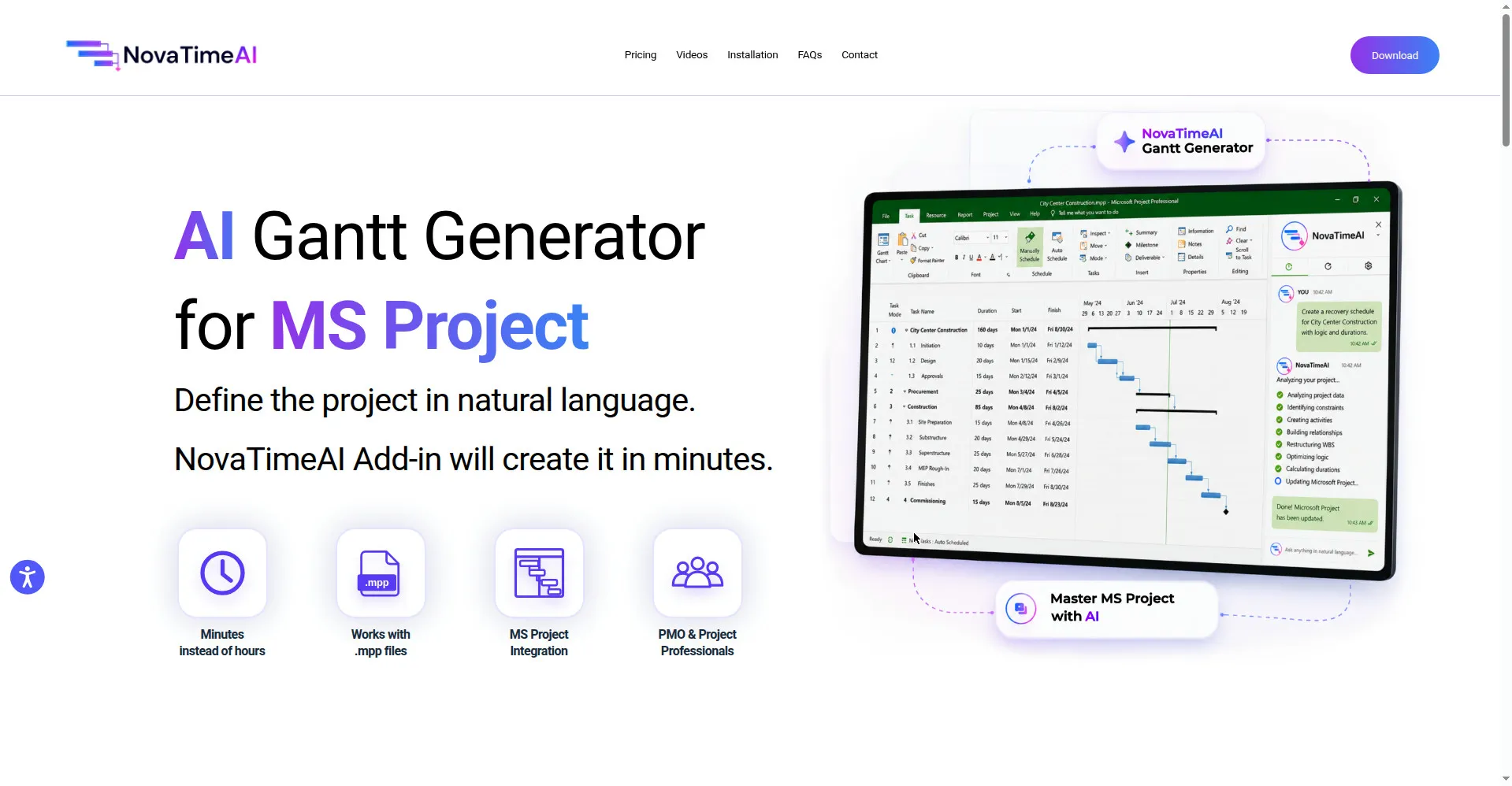
NovaTimeAI homepage — AI Gantt Generator for MS Project
1 / 2Overview
What is NovaTimeAI?
AI Gantt Generator for MS Project
NovaTimeAI — AI Gantt Generator for MS Project
NovaTimeAI is an AI-powered add-in for Microsoft Project that helps project managers generate Gantt charts, make project changes, ask questions, and analyze schedules without leaving their existing workflow.
How it works
Type a plain-language summary of your project scope, milestones, dates, and project goals. NovaTimeAI processes your input and turns it into a structured Gantt plan directly in MS Project — in minutes instead of hours. It can read text, Word documents, Excel spreadsheets, PDF files, and MPP files, so existing documents become schedules without manual data entry.
Key highlights
- Natural-language Gantt generation: describe the project in plain language; the add-in builds tasks, milestones, dates, and dependencies for you.
- Plain-language plan edits: add milestones or adjust tasks conversationally, and the existing Gantt chart updates in sync.
- In-workflow AI Q&A: ask questions about your schedule and get AI-powered schedule analysis right inside MS Project.
- Multi-format input: import scope from text, Word, Excel, PDF, or MPP files and export plans to MPP or Excel.
- True MS Project integration: runs as a native add-in in MS Project Desktop (2016 and newer) — no tool-switching, no retraining.
Requirements and pricing
Requires Windows 10/11 and Microsoft Project Desktop 2016 or newer. Download is free of charge until October 30th, 2026; pricing after that date has not been announced.
Platforms and languages
NovaTimeAI Availability
Platforms
Languages
Capabilities
NovaTimeAI Key Features
AI Gantt generation
Describe project scope, tasks, milestones, dates, and dependencies in natural language and get a structured Gantt plan in minutes.
Multi-format input parsing
Import project input from plain text, Word documents, Excel spreadsheets, PDF files, and MPP files.
Conversational plan edits
Add milestones or adjust tasks in plain language; the existing Gantt chart updates in sync.
AI Q&A and schedule analysis
Ask questions about your project and get AI-driven schedule analysis inside your current workflow.
Native MS Project integration
Runs natively as an add-in in Microsoft Project Desktop, with .mpp file support and no retraining needed.
Best for
Who uses NovaTimeAI?
Project managers and PMO teams using Microsoft Project
Generate structured Gantt plans from plain-language project descriptions in minutes instead of hours.
Engineering and construction project teams
Turn Word, Excel, PDF, or MPP documents into MS Project schedules without manual data entry.
Plans and access
NovaTimeAI Pricing
Free
Free download until Oct 30, 2026; pricing after that date not announced.
Common questions
NovaTimeAI FAQs
How much does NovaTimeAI cost?
Download is currently free of charge until October 30th, 2026. Pricing after that date has not been announced.
What do I need to run it?
It needs Windows 10/11 and Microsoft Project Desktop 2016 or newer — it's a Windows desktop add-in, not a web app.
Which file formats can it read?
It accepts plain text, Word documents, Excel spreadsheets, PDF files, and MPP files, and can export plans to MPP or Excel.
Is the download safe?
The installer is code-signed by a trusted certificate; the vendor states it is 100% safe, clean, and free of malware or adware.
Do I have to change how I work?
No — it runs as an add-in inside your existing MS Project workflow, so there's no new tool to learn or switch to.
Reviews
See what the community thinks and share your experience.
—
Based on 0 ratings
Rating distribution
Community reviews
No reviews
No written reviews yet.