ABrush AI
AI studio inside Photoshop: generate, edit and upscale images.
AI studio inside Photoshop: generate, edit and upscale images.
a3.png
1 / 3Overview
What is ABrush AI?
AI studio inside Photoshop: generate, edit and upscale images.
ABrush is an AI-powered creative studio that lives inside Adobe Photoshop. It was developed in Ukraine by AB Games, a mobile game company, for the digital artists, game art teams, and studios who spend their working day in Photoshop and want generative AI to be part of that workflow, not a detour from it.
The problem it solves
Most AI image tools are separate destinations: a web app, a Discord bot, a local interface with its own learning curve. In a production setting, an artist generates an image in one place, downloads it, imports it into Photoshop, finds it needs changes, and repeats the cycle. That constant exporting, switching, and re-importing adds friction to every iteration, and across a whole art team it becomes a real production cost.
ABrush removes that loop by bringing the AI to the artist. Generation and editing happen in a panel inside Photoshop, and results land directly in the working document.
How it works
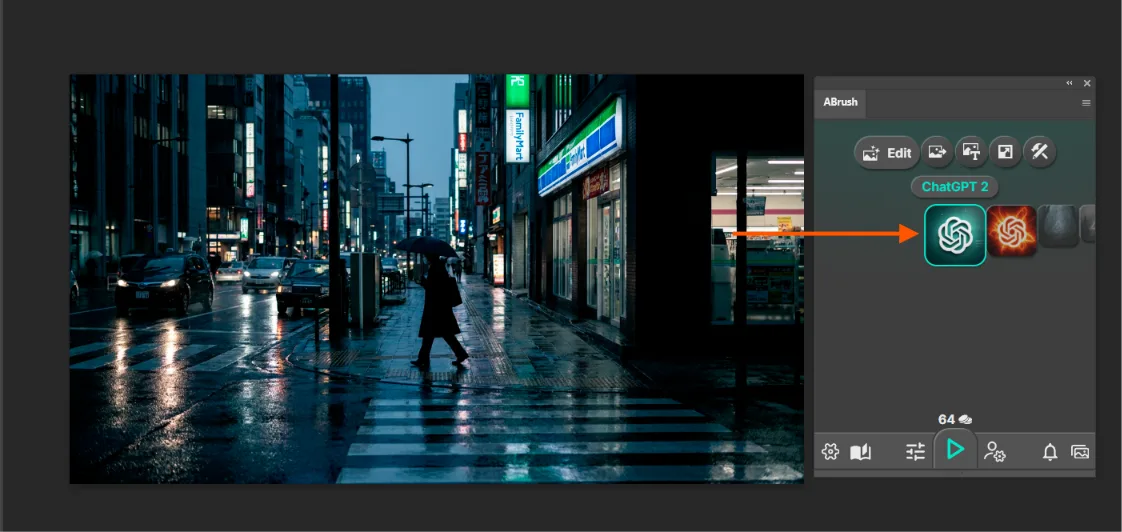
The artist opens the ABrush panel, writes a text prompt or selects an area of the current image, chooses a model and settings, and generates. Results arrive as separate Photoshop layers, so they are non-destructive. The artist can mask, blend, paint over, or discard them with the tools they already know. The AI provides a strong starting point or a targeted fix, and the artist keeps full control over the final image.
Core capabilities
ABrush gives access to more than 23 AI models, including Stable Diffusion, Flux, and Qwen Image, and supports model modifications that adjust how each model behaves. Artists can pick the right engine for each task instead of being locked into one vendor’s look.
It supports both text-to-image generation and selection-based editing, which regenerates only a chosen region. That makes it useful both for creating from scratch and for practical fixes like correcting anatomy, swapping objects, or extending a background.
For control over the result, ABrush includes ControlNet, which lets sketches, poses, or structural references guide the composition, and LoRA styles, which keep a consistent visual identity across many generations. Together they address a major weakness of generic AI generators: unpredictability. Studios can keep art direction consistent across artists and assets.
Platforms and languages
ABrush AI Availability
Platforms
Languages
Product video
ABrush AI in action
Capabilities
ABrush AI Key Features
Native Photoshop Panel.
ABrush runs as a plugin panel inside Adobe Photoshop, so artists generate and edit images without leaving their workspace or juggling exports and imports.
Multi-Model Access.
More than 23 AI models, including Stable Diffusion, Flux, and Qwen Image, are available from one interface, so artists can pick the right model for each task.
Text-to-Image Generation.
Artists can create new images from text prompts directly on the canvas.
Selection-Based Editing
Artists can create new images from text prompts directly on the canvas.
LoRA Styles.
LoRA styles apply consistent visual styles across generations, which helps keep art direction cohesive across a project.
ControlNet Support
ControlNet guides generation with structural inputs such as sketches, poses, or depth, giving precise control over composition.
Best for
Who uses ABrush AI?
Game artists and art teams.
This is the core audience. ABrush comes from AB Games, a game studio, and its messaging centres on production pipelines and art-team savings.
Concept artists.
They need to explore many visual directions quickly before committing to a final design.
Illustrators and digital painters.
They want AI help with backgrounds, variations, or base images, then finish the work by hand.
Graphic designers.
They produce visuals for branding, layouts, and campaigns.
Photographers and retouchers.
Photographers and retouchers.
Plans and access
ABrush AI Pricing
Freemium
12$
ABrush AI Alternatives
 Higgsfield AIFree AI Video & Image Generator
 HiggsfieldAI-native creative suite for cinematic video, professional images, and AI-generated marketing content.
Reviews
See what the community thinks and share your experience.
5.0
Based on 1 ratings
Rating distribution
Community reviews
No reviews
No written reviews yet.