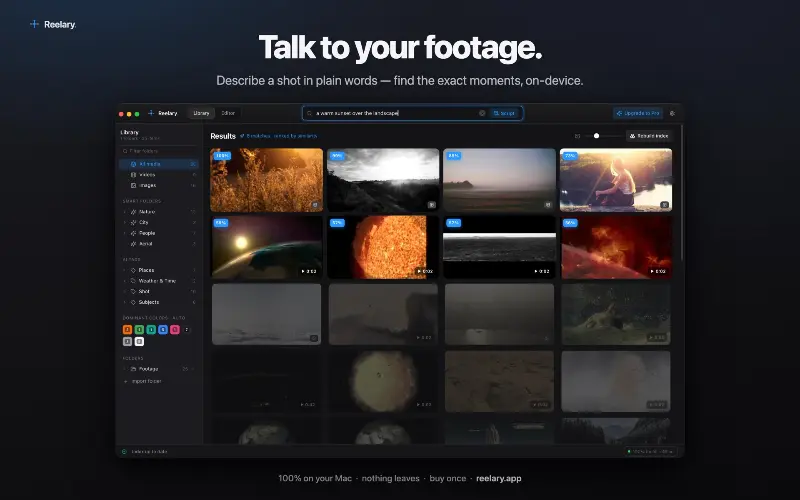
Find files by what they contain, not just by name.

visual-search.png
1 / 3Overview
What is Archivemind?
Find files by what they contain, not just by name.
ArchiveMind is a private, local-first desktop app for searching large file collections across folders and external drives. It helps you find files by what they contain, not just by filename, without forcing you to reorganize everything first. Your data stays on your computer—no cloud storage, no account, and no telemetry.
Platforms and languages
Archivemind Availability
Platforms
Languages
Product video
Archivemind in action
Capabilities
Archivemind Key Features
Find files by what they contain, not just by name.
Search your files by what is in the file not the name of the file. "birthday cake""sunset""beach"
find duplicates
Use ArchiveMind to find duplicate files. You can then locate those duplicates and make deletions or changes yourself.
Local off line.
The AI is local on your computer. nothing leaves, no external server to connect to. Everything is yours and local on your computer.
Best for
Who uses Archivemind?
Photographers
Find people, locations, browse by camera types, meta data searches.
Businesses
Search invoices by contents, no need to remember file names, search by the contents, date, location, $ amount. "swivel caster""xyz company""$14.98"
Writers
Search by words and phrases, character names, etc.
Plans and access
Archivemind Pricing
Paid
$49 one-time purchase
Free up to 10,000 files, then $49 unlocks full use with license.
Common questions
Archivemind FAQs
Does ArchiveMind upload my files?
No. Indexing reads files locally and stores what it learned in your local catalogue. Nothing is uploaded.
Can it really search a drive that's unplugged?
Yes — that's the point. Once everything is indexed it stays searchable; the originals open again when the drive reconnects.
What file types are supported?
Every file is catalogued, fingerprinted, and duplicate-checked. Beyond that, each format gets the metadata, text, and preview treatment it supports — labelled honestly where it doesn't.
What languages does ArchiveMind support?
Your files can be in any language — filenames and document text are catalogued and searched as Unicode, accents included. The interface is in English, and visual search understands English descriptions best. Chinese, Japanese, and Korean text searches poorly for now; we say so rather than pretend.
Compare similar tools
Archivemind Alternatives
Reviews
See what the community thinks and share your experience.
—
Based on 0 ratings
Rating distribution
Community reviews
No reviews
No written reviews yet.